
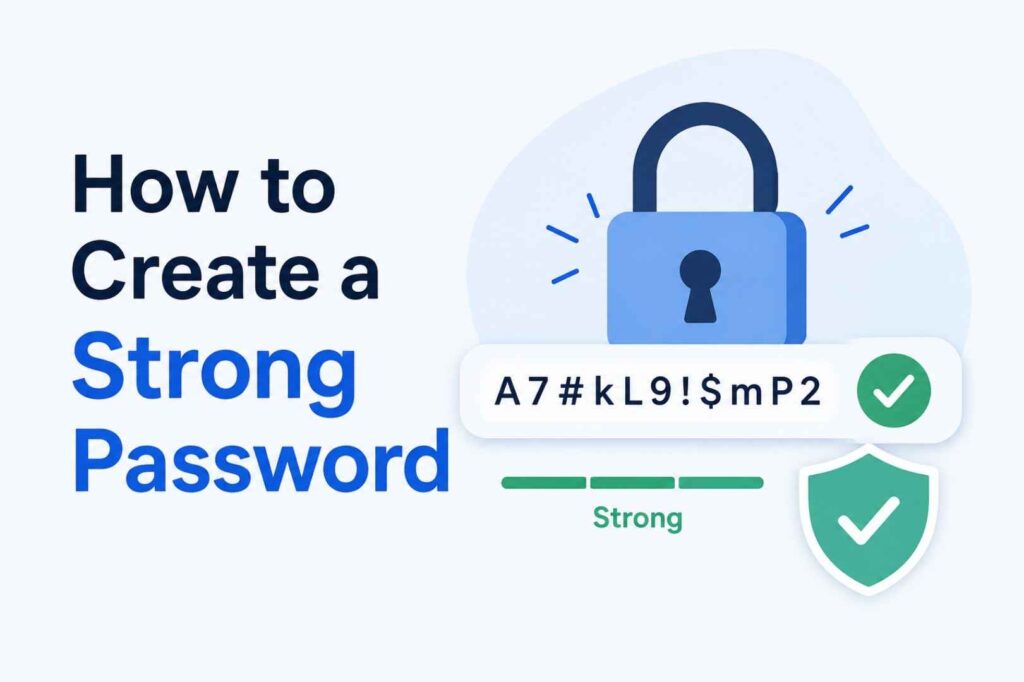
On 7 May 2026 — World Password Day — security experts issued a blunt verdict: passwords alone are no longer enough. AI-powered cracking tools, credential-stuffing bots, and data breaches exposing billions of records have turned even “strong” passwords into a ticking clock.
Here is where things stand right now:
- 80% of data breaches still involve weak, stolen, or reused passwords (Verizon DBIR 2025)
- The Hive Systems 2025 Password Table showed cracking times dropped nearly 20% in a single year — driven by faster GPUs and AI-optimised hardware
- An 8-character numeric password is cracked instantly with modern hardware
- The average person manages 100+ passwords — and most of them are dangerously weak or reused
- 26 billion records were leaked in the so-called “Mother of All Breaches” in 2024 alone; those credentials are actively circulating on dark-web markets today
None of this means you are powerless. Creating strong, uncrackable passwords is straightforward once you understand what actually matters. This guide covers everything: the science behind strong passwords, proven creation methods, the tools that do the heavy lifting for you, and where authentication is heading in 2026 with passkeys.
What Makes a Password Strong? The 3 Pillars
Before jumping to techniques, you need to understand what attackers are actually doing — because the answer shapes every rule here.
Hackers use three main approaches:
- Brute-force attacks — Automated software cycles through every possible combination of characters until it finds the right one. The speed of this attack depends almost entirely on your password’s length.
- Dictionary attacks — Instead of random guessing, tools run through lists of real words, common phrases, and known compromised passwords. This is why using any recognisable word — even with substitutions — is dangerous.
- Credential stuffing — Attackers take username and password pairs leaked from one breach and automatically try them across dozens of other sites. This is why password reuse is catastrophic.
A truly strong password defeats all three. That requires three things:
Pillar 1: Length — The Single Most Powerful Factor
Use at least 16 characters. Aim for 20+.
Length is the biggest lever you have. Here is why: every additional character you add does not just add one more option — it multiplies the total number of possible combinations exponentially.
According to the Hive Systems 2025 Password Table, using 12 RTX 5090 GPUs:
| Length | Numbers only | Lowercase only | Upper + Lower + Numbers + Symbols |
|---|---|---|---|
| 8 characters | Instantly | 3 weeks | 7 months |
| 12 characters | Instantly | 4,000 years | 26 billion years |
| 16 characters | 2 seconds | Millions of years | Practically uncrackable |
| 18+ characters | Minutes | Billions of years | Beyond current technology |
The lesson is stark: a 16-character password using only lowercase letters is stronger than an 8-character password stuffed with symbols.
NIST guideline: The National Institute of Standards and Technology allows passwords up to 64 characters — including spaces — specifically to encourage long passphrases. They have also dropped mandatory complexity rules, recognising that length matters more.
Pillar 2: Randomness — Stop Being Predictable
Humans are terrible at creating randomness. We unconsciously reach for:
- Names of people, pets, or places we love
- Dates that matter to us (birthdays, anniversaries)
- Words from our native language
- Keyboard patterns (qwerty, 12345, asdfgh)
- Clever-looking substitutions (@ for a, 0 for o, 3 for e)
Attackers know all of this. Modern cracking tools do not guess randomly — they use pattern recognition, machine learning trained on leaked password databases, and prioritised guessing based on how humans actually behave. “P@ssw0rd!” is not clever; it is in every cracker’s dictionary.
True randomness means: no patterns, no personal information, no recognisable words used alone, no predictable substitutions.
Pillar 3: Uniqueness — One Password Per Account, No Exceptions
If you use the same password on two accounts and one of those services is breached, both accounts are compromised instantly. Attackers run automated credential-stuffing tools that test leaked pairs across hundreds of sites within minutes.
“Small changes” do not help. Adding “2” or “!” to the end of a reused password is a pattern that cracking tools specifically look for.
Every account needs its own completely distinct password. Full stop.
5 Proven Methods to Create a Strong Password
Method 1: The Passphrase (Best for Memorability)
A passphrase strings together 4–7 completely unrelated, random words. It is the method recommended by CISA, NIST, and the UK’s NCSC because it is both long and genuinely random — yet human brains can remember it.
How to build one:
- Pick 4–7 words with no obvious connection to each other or to you
- Avoid words from song lyrics, movie quotes, or common idioms — dictionary attacks target these
- Mix in some symbols or numbers between words for extra entropy
- Make it long enough that length alone protects you
Strong passphrase examples (do not use these — create your own):
Cloud!Pencil7Rocket$MangoBuffal0-Galaxy-Watermelon-Sunris5Fence River9 Moon Desk!Purple Coffee Running Lamp 2026
A 20-character passphrase like “Purple Coffee Running 2026” is dramatically harder to crack than a short, complex string like “P@ss1!” — modern computers take far longer to brute-force length than complexity.
You can even include spaces on most platforms: fence river moon desk is 18 characters and highly entropy-rich.
Method 2: The Random String (Most Secure)
A fully random sequence of uppercase letters, lowercase letters, numbers, and symbols gives the highest possible security. The trade-off: it is nearly impossible to memorise, which is exactly why you should let a password manager generate and store it for you.
Example format: gT#3kWp!9mZr@Lx5qN
If you are setting up a password manager, this is the format you want for every site in your vault. Let the tool do the work.
Method 3: The Sentence Method (Good for a Master Password)
Choose a memorable, unique sentence from your life — something only you would know — and build a password from its initial letters, numbers, and punctuation.
Example:
- Sentence: “My daughter Maya started school at Green Valley in September 2019!”
- Password:
MdMssaGViS2019!
Use a longer, more personal sentence to push towards 16+ characters. This method works especially well for the one password you need to remember: your password manager’s master password.
Method 4: The Diceware Method (Truly Random Passphrases)
Diceware is a physical method for generating provably random passphrases. Roll five standard dice, look up the resulting number in the EFF’s wordlist, and repeat 4–6 times. Because the process is physically random, it eliminates the unconscious patterns humans introduce when “randomly” picking words.
The EFF provides a free wordlist at eff.org. The result might be something like: pasta staple glare cove rivet — awkward, memorable, and cryptographically random.
Method 5: Use a Password Generator (Most Practical for Most People)
All reputable password managers include a built-in generator. You set your desired length (aim for 16+) and character mix, and the tool instantly creates a fully random, unique password — then stores it automatically.
This is the most realistic approach for managing dozens or hundreds of accounts. No creativity required, no human bias introduced.
What Absolutely Not to Do: Common Password Mistakes
These patterns look like security but provide almost none:
| Mistake | Why It Fails |
|---|---|
password123 | Top of every cracker’s dictionary |
JohnSmith1990 | Name + birth year = a two-second guess |
P@ssw0rd! | Common substitution, widely known to attackers |
qwerty123 | Keyboard pattern, instantly recognised |
iloveyou2 | Consistently in the top 20 most-used passwords worldwide |
| Same password + “2” on another site | Credential-stuffing tools check this variation first |
| Any word from the dictionary, used alone | Dictionary attacks crack these in milliseconds |
| Your pet’s name + year | Social media makes this trivially guessable |
| Using work passwords for personal accounts | Cross-contamination; one breach exposes both |
| Sharing via email or text | Transmitted credentials are exposed credentials |
A particularly insidious trap is the “clever substitution” — replacing letters with symbols (@ for a, 3 for e, 0 for o). These feel creative but are so well-known to attackers that they are explicitly built into modern cracking rulesets.
Password Managers: The Tool That Makes Everything Possible
The honest truth: it is impossible for a human brain to create and remember 16-character unique random passwords for 100+ accounts. Acknowledging this is not a weakness — it is the first step toward actually being secure.
Password managers are the solution. A good password manager:
- Generates long, random, unique passwords instantly for every new account
- Stores them in an encrypted vault that only you can access
- Auto-fills login credentials across browsers and devices
- Alerts you when a password has appeared in a known breach
- Audits your existing passwords for weakness, reuse, and age
- Syncs securely across all your devices
You only need to remember one strong password: the master password for your vault.
Modern password managers use zero-knowledge encryption, meaning the provider cannot see your passwords even if they wanted to. Always enable multi-factor authentication on your password manager itself.
Well-regarded password managers in 2026:
- Bitwarden — Open-source, independently audited, generous free tier
- 1Password — Polished experience, excellent for families and teams, Travel Mode for border crossings
- Proton Pass — Privacy-first, from the makers of ProtonMail, strong free plan
- Dashlane — Excellent breach monitoring and dark web scanning
- Apple Keychain / Google Password Manager — Built into your ecosystem, good starting points for beginners
For your master password, use the sentence method or diceware to create something 20+ characters that you can genuinely memorise. Write it on paper and keep it in a physically secure place — not on your computer, not in a notes app, not emailed to yourself.
Multi-Factor Authentication (MFA): Your Safety Net
Even a perfect password can be stolen — through phishing, malware, or a server-side breach beyond your control. Multi-factor authentication (MFA) means an attacker needs more than just your password to get in.
MFA types, ranked from strongest to weakest:
- Hardware security key (YubiKey, Google Titan) — A physical device you plug in or tap. Completely phishing-resistant. Best option for high-value accounts.
- Authenticator app (Google Authenticator, Authy, Microsoft Authenticator) — Generates time-based codes every 30 seconds. Very secure, works without mobile signal.
- Push notification (Duo, Microsoft Authenticator) — Approve a login via app notification. Convenient and strong, but vulnerable to “MFA fatigue” attacks where attackers spam requests.
- SMS text code — Better than no MFA, but vulnerable to SIM-swapping attacks where criminals port your phone number to a device they control. Avoid for critical accounts.
Enable MFA on, at minimum:
- Your primary email account (it controls password resets for everything else)
- Banking and financial accounts
- Your password manager
- Social media accounts
- Work accounts and VPNs
Important: World Password Day 2026 commentary from security leaders flagged that SMS-based MFA is increasingly unreliable as AI makes SIM-swap attacks cheaper and faster. If you are using SMS codes for anything critical, upgrade to an authenticator app now.
The Big Shift: Passkeys Are Taking Over in 2026
Here is something every password guide in 2026 must address honestly: the era of passwords is ending.
Passkeys are a fundamentally different approach to authentication, and 2026 is the year they crossed from “interesting experiment” to mainstream reality:
- 15 billion accounts can now authenticate with passkeys (FIDO Alliance, 2026)
- Google reported over 1 billion passkey sign-ins per month in late 2025 — with a 99.9% lower account compromise rate than passwords
- Apple made passkeys the default sign-in method for new iCloud accounts (WWDC 2025)
- Microsoft has been pushing “passwordless by default” for new Microsoft 365 accounts
- The UK’s NCSC made headlines in April 2026 by officially recommending passkeys as consumers’ first choice for authentication — explicitly moving away from decades of password guidance
- Passkey logins are up to eight times faster than username + password + MFA combinations
How passkeys work: Instead of a shared secret (your password) stored on a server, a passkey uses public-key cryptography. Your device generates a private key (which never leaves your device) and a public key (sent to the service). Logging in requires proving possession of the private key via biometrics or a PIN — locally on your device. No password is ever transmitted or stored on a server.
Why this matters:
- Passkeys cannot be phished — there is nothing to type into a fake site
- They cannot be leaked in a server breach — the server never has your private key
- They cannot be guessed or brute-forced
- They are faster and easier than any password workflow
Where passkeys work today: iOS 16+, Android 9+, Windows 10+ with Windows Hello, macOS 13+ with Touch ID, Chrome, Safari, Firefox, Edge. Major services including Google, Apple, Microsoft, GitHub, PayPal, eBay, and many more.
The practical advice: Enable passkeys on every account that offers them. Where passkeys are not yet available, use a password manager with strong unique passwords and MFA. The transition is happening — but passwords will remain necessary for years, which is why everything above still matters.
Security Questions: The Hidden Weak Link
Security questions are often treated as a backup password, but they are frequently the weakest link in an account’s security chain. “Mother’s maiden name,” “first pet,” “childhood street” — all of this is searchable on social media, public records, or through simple conversation.
The fix: Never answer security questions truthfully. Treat them as a second password field. Generate a random answer (e.g., “Mother’s maiden name?” → fK9#mTvz2) and store it in your password manager.
Alternatively, use the same random-word approach as passphrases: “Mother’s maiden name?” → RocketCoffeeLamp. Memorable, unique, unfindable.
How to Check If Your Passwords Are Already Compromised
Your credentials may already be in circulation without your knowledge. Check using:
- Have I Been Pwned (haveibeenpwned.com) — Enter your email address to see if it appears in known breach datasets. Free and run by respected security researcher Troy Hunt.
- Your password manager’s breach monitoring — Most paid password managers continuously scan breach databases and alert you when a stored password appears in a known leak.
- Google Password Checkup / Apple Password Monitoring — Built into Chrome and Safari/iOS respectively; flags passwords found in breaches.
If any of your passwords appear in a breach, change them immediately — not just on the breached site, but anywhere you have reused them.
When to Change Your Passwords
Old guidance told you to change passwords every 60–90 days. This is now known to be counterproductive. Research from Microsoft and NIST confirms that forced regular rotation causes people to choose weaker passwords or make predictable incremental changes (password1 → password2 → password3).
Change a password when:
- You receive a breach notification from a service
- You discover it has appeared in Have I Been Pwned
- You have shared it with someone (even temporarily)
- You suspect your account has been accessed without your knowledge
- You are transitioning from a reused password to a unique one as part of an overall security cleanup
Strong, unique passwords maintained with a password manager do not need scheduled rotation.
Your Complete Strong Password Checklist
Use this before setting any new password:
The password itself:
- 16 characters minimum (20+ preferred)
- Mix of uppercase letters, lowercase letters, numbers, and symbols
- No personal information (name, birthday, pet, city, favourite team)
- No dictionary words used alone
- No keyboard patterns (qwerty, 12345, asdfgh)
- No recognisable substitutions (@, 0, 3, !, 1)
- Not used on any other account — ever
Storage and protection:
- Stored in a reputable password manager — not in a notes app, spreadsheet, or browser save without a master password
- MFA enabled on this account
- MFA enabled on your email account (it controls resets for everything else)
- Email address checked on Have I Been Pwned
- Passkey enabled on this account if supported
For your password manager:
- Master password is 20+ characters using the sentence or diceware method
- MFA enabled on the manager itself
- Emergency access set up (most managers allow a trusted person to request access after a waiting period)
A Practical Action Plan: Start Here
If this all feels overwhelming, do not try to fix everything at once. Here is a prioritised order:
Week 1 — Install a password manager. Set up Bitwarden or your preferred option. Create a strong master password. Import any saved browser passwords.
Week 2 — Secure your three most critical accounts. Email, banking, and your primary social media. Generate new, unique passwords for each with your manager. Enable MFA on all three — use an authenticator app, not SMS.
Week 3 — Audit for reuse. Run your password manager’s reuse report. Update any duplicates, starting with financial and health accounts.
Ongoing — Enable passkeys wherever offered. When a service prompts you to set up a passkey, do it. This is the fastest path to genuinely phishing-resistant authentication.
Final Word: Security That Works in 2026
The threat landscape of 2026 is not the same one that gave us the “8 characters with a capital letter and a symbol” rule. AI-grade hardware can now tear through short passwords at speeds that make old guidance look dangerously naive. And credential-stuffing bots work at a scale that makes reuse an almost certain path to compromise.
But the solution has never been simpler to deploy:
- Use a password manager — Generate unique, random passwords for every account. Stop relying on memory.
- Use 16+ characters — Length wins, every single time.
- Enable MFA — On every account, especially email and banking.
- Enable passkeys — Wherever they are offered. This is the future, and it is already here.
You do not need to be a security professional to be well-protected. You need the right tools and the right habits. Start with Step 1 today.

Get the TrustPost briefing
The stories that matter, in your inbox. No spam, unsubscribe anytime.
Newsletter signup will be available soon.
Related stories
Dropshipping Marketing: How to Get Your First Sales
Dropshipping marketing that works in 2026: the channels worth using, the profit numbers that matter, how to get first sales, and the mistakes that waste budget.

Amazon Dropshipping: How It Works and the Rules
Amazon dropshipping explained: how it works, Amazon's strict policy, the seller-of-record rule, the pros and cons, and mistakes that get accounts banned.
How to Start a Shopify Dropshipping Store
How to set up a Shopify dropshipping store step by step: account, supplier apps, product pages, fees, and the settings beginners get wrong before launch.