If your car has wired Apple CarPlay but you’re tired of plugging in your iPhone every time you drive, a wireless Apple CarPlay adapter is the solution. These small devices plug into your car’s USB port and convert your existing wired CarPlay system into a wireless one. You get all the same features—navigation, music, calls, and messages—without the cable.
This guide explains exactly what wireless CarPlay adapters are, how they work, which ones are worth buying, and whether you actually need one for your car.
What Is a Wireless Apple CarPlay Adapter?
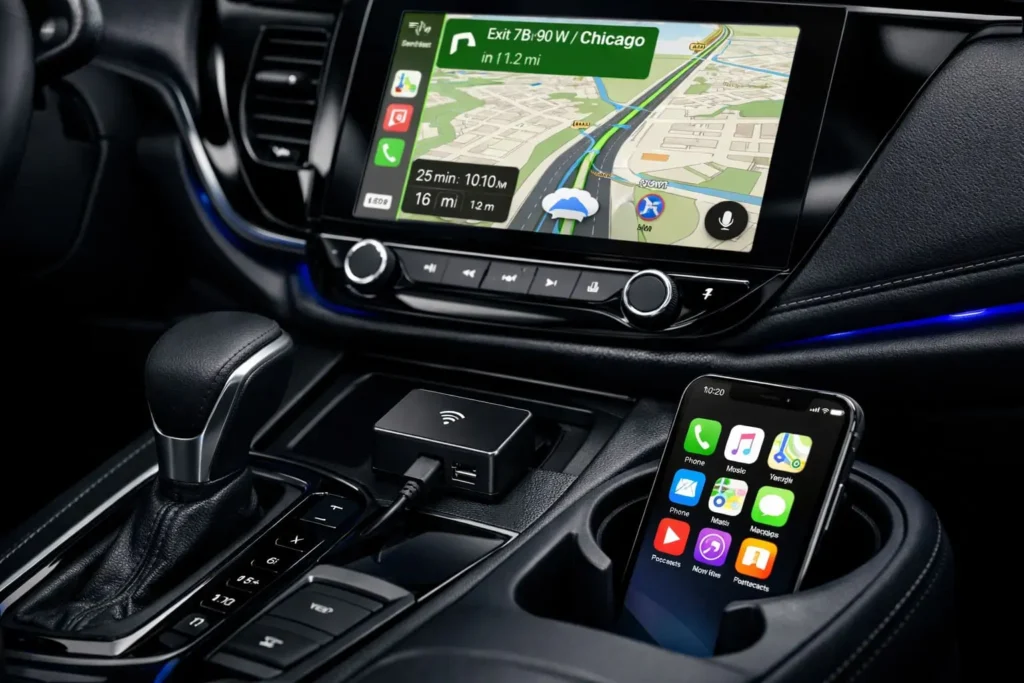
A wireless Apple CarPlay adapter is a small plug-in device that adds wireless connectivity to cars that only have wired Apple CarPlay. It works as a bridge between your iPhone and your car’s infotainment system.
Here’s how it works: The adapter plugs into your car’s USB port (the same one you’d normally use for the CarPlay cable). It then creates a wireless connection to your iPhone via Bluetooth and Wi-Fi. Your car’s system thinks an iPhone is plugged in with a cable, but you’re actually connecting wirelessly.
The adapter doesn’t change what CarPlay can do—you still get the same maps, music apps, and phone features. It just removes the need to physically plug in your phone every time you start the car.
Do You Already Have Wireless CarPlay?
Some newer cars come with wireless CarPlay built-in from the factory. If your car already supports wireless CarPlay, you don’t need an adapter.
To check if you already have wireless CarPlay:
- Start your car
- On your iPhone, go to Settings > General > CarPlay
- If you see your car listed without being plugged in, you already have wireless CarPlay
If you have to plug in your iPhone to see CarPlay, then an adapter will upgrade your system to wireless.
How Does a Wireless CarPlay Adapter Actually Work?
Understanding the technical process helps explain why some adapters work better than others.
The Connection Process
When you start your car with a wireless CarPlay adapter installed:
- The adapter powers on when your car starts
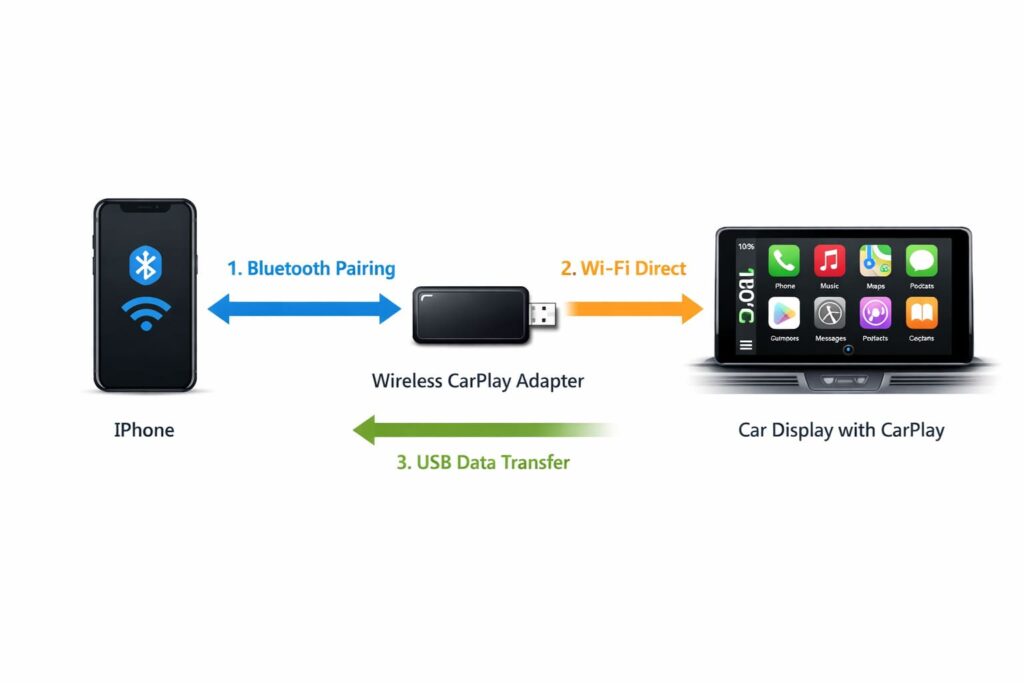
- It broadcasts a Bluetooth signal that your iPhone detects
- Your iPhone connects to the adapter via Bluetooth first
- The adapter then establishes a Wi-Fi Direct connection (this is what carries the actual CarPlay data)
- Your car’s system receives the signal through the USB port and displays CarPlay
This entire process usually takes 5-15 seconds. The best adapters connect in under 10 seconds. Budget models can take 20-30 seconds or require manual reconnection.
What You Need for It to Work
Your setup must have three things:
1. A car with factory wired Apple CarPlay – The adapter won’t add CarPlay to a car that doesn’t already have it. It only converts wired to wireless.
2. An iPhone running iOS 10 or newer – Older iPhones work, but iOS 14 or newer gives the best performance.
3. A working USB port – The port must be the same one your car uses for wired CarPlay, not just any USB charging port.
Do Wireless CarPlay Adapters Have Lag or Connection Issues?
This is the biggest concern people have, and the answer depends on which adapter you buy.
Connection Speed and Stability
Quality adapters use modern Wi-Fi chips that minimize lag. You’ll notice a 1-2 second delay when tapping navigation buttons or switching apps compared to wired, but this is barely noticeable in real-world use.
Cheap adapters (usually under $40) often have:
- 3-5 second lag when tapping buttons
- Dropped connections while driving
- Audio stuttering during phone calls
- Failure to reconnect automatically
Premium adapters ($80-$150) typically have:
- Minimal lag (1-2 seconds)
- Stable connections even on long drives
- Clear audio quality
- Automatic reconnection every time you start the car
Real-World Performance Factors
Connection quality also depends on:
Your car’s USB port location – If the port is in a closed compartment or glove box, the wireless signal may be weaker. Ports in the center console work best.
Interference – Other wireless devices (garage door openers, toll transponders, radar detectors) can sometimes cause brief interruptions.
iPhone condition – Older iPhones with worn Bluetooth/Wi-Fi hardware may connect slower.
Most people find that a good-quality adapter feels almost identical to wired CarPlay after the initial connection.
Which Wireless CarPlay Adapters Are Worth Buying?
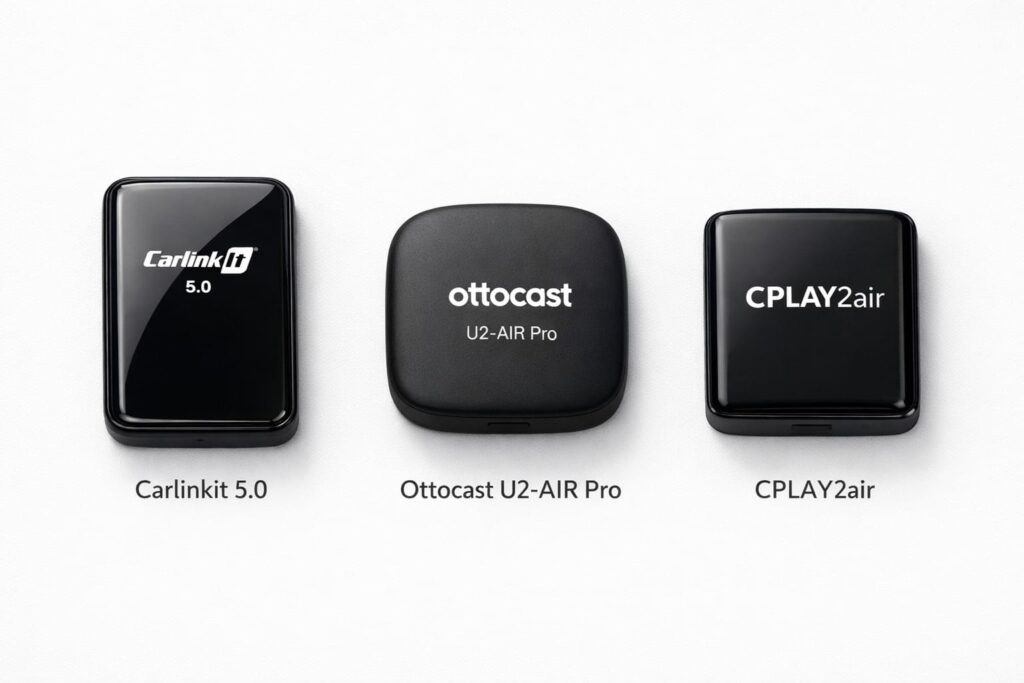
Not all adapters are equal. Here are the ones that consistently perform well based on compatibility, connection speed, and reliability.
Premium Pick: Carlinkit 5.0 (AI Box)
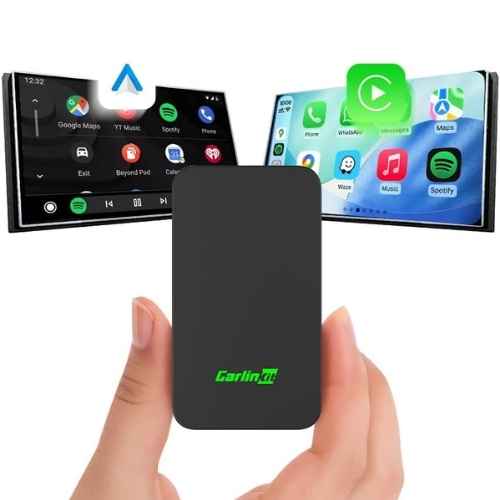
The Carlinkit 5.0 is one of the most reliable adapters on the market. It uses a newer chipset that connects in 7-10 seconds and maintains stable connections even on long road trips.
It works with over 800 car models and supports both Apple CarPlay and Android Auto (if you switch phones). The build quality is solid, and customer support is responsive.
Best Value: Ottocast U2-AIR Pro
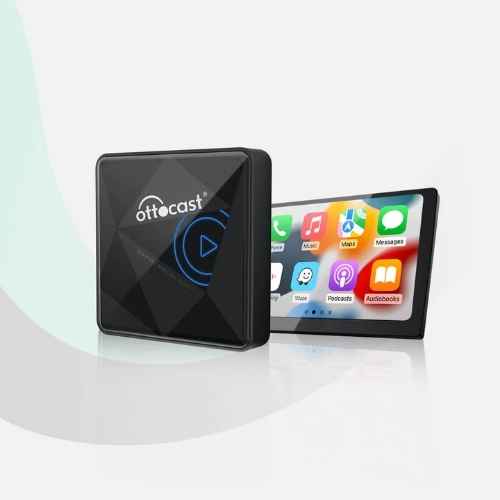
The Ottocast U2-AIR Pro offers excellent performance at a lower price point. Connection time is around 10-12 seconds, which is acceptable for daily use. It supports firmware updates to fix bugs and improve compatibility.
The main limitation is that it only works with Apple CarPlay—no Android Auto support if you ever switch to an Android phone.
Budget Option: CPLAY2air (Original)
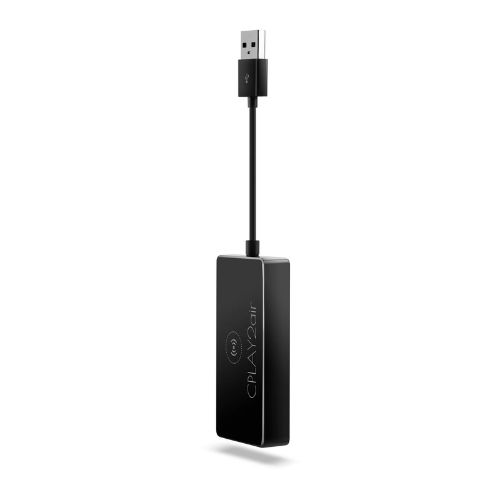
The CPLAY2air is the original wireless adapter that started the trend. While newer models exist, this one still works reliably if you find it on sale. Connection time is 15-20 seconds, slower than newer models but functional.
It’s best suited for people who want to test wireless CarPlay without spending over $100.
What to Avoid
Skip any adapter that:
- Costs under $40 (usually unreliable)
- Has mostly 3-star or lower reviews
- Doesn’t specify which car models it supports
- Comes from unknown brands with no support
Comparison of Top Wireless CarPlay Adapters
| Adapter | Connection Time | Android Auto Support | Firmware Updates | Price Range | Best For |
|---|---|---|---|---|---|
| Carlinkit 5.0 | 7-10 seconds | Yes | Yes | $120-$140 | Users who want the most reliable performance |
| Ottocast U2-AIR Pro | 10-12 seconds | No | Yes | $85-$100 | iPhone users who want good value |
| CPLAY2air Original | 15-20 seconds | No | Limited | $60-$80 | Budget-conscious buyers willing to wait longer |
How to Install a Wireless CarPlay Adapter
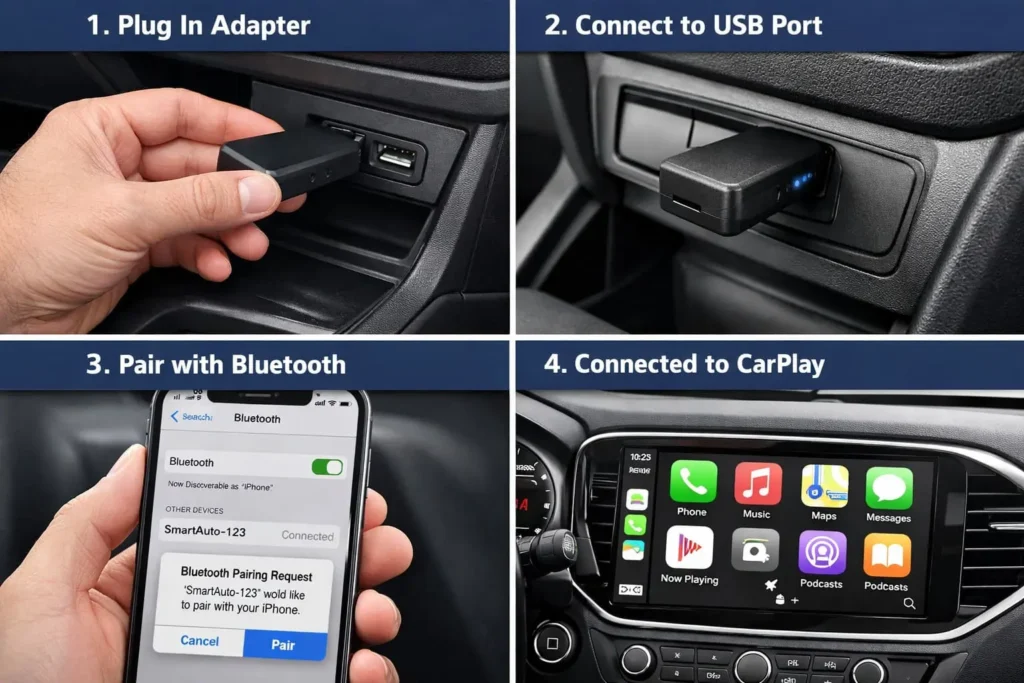
Installation is straightforward and takes less than 2 minutes.
Step-by-Step Installation
- Locate your CarPlay USB port – This is the port you normally use to plug in your Lightning cable for CarPlay. It may be labeled with a phone icon.
- Plug in the adapter – Insert the adapter directly into the USB port. If your car has a USB-C port, make sure you buy an adapter with USB-C (or use the included adapter).
- Start your car – Turn on your ignition. The adapter will power on automatically.
- Connect your iPhone – Go to Settings > Bluetooth on your iPhone. You should see the adapter appear as a Bluetooth device (usually named “AutoKit” or similar). Tap to pair.
- Wait for CarPlay to appear – After Bluetooth pairs, CarPlay should appear on your car’s screen within 10-20 seconds.
- Future connections are automatic – From now on, CarPlay will connect automatically when you start your car with your iPhone nearby.
Troubleshooting Tips
If CarPlay doesn’t appear:
- Unplug the adapter and plug it back in
- Restart your iPhone
- Forget the Bluetooth device and pair again
- Check if your car’s software needs an update
- Make sure you’re using the correct USB port (not just a charging port)
Does Wireless CarPlay Drain Your iPhone Battery Faster?
Yes, but not as much as you might think.
Wireless CarPlay uses both Bluetooth and Wi-Fi, which consumes more power than a wired connection. However, the difference is manageable.
Real-World Battery Impact
During a typical 30-minute commute with navigation and music:
- Wired CarPlay charges your phone about 15-20%
- Wireless CarPlay drains your phone about 5-10%
On a longer 2-hour road trip with navigation:
- Wired CarPlay fully charges your phone
- Wireless CarPlay keeps your phone around the same percentage or drops it 10-20%
Solutions for Battery Drain
If you take long trips and need your phone charged:
1. Add a wireless charging mount – Most modern iPhones support wireless charging. A wireless charging phone mount in your car keeps your phone charged without cables.
2. Keep a Lightning cable handy – For road trips, you can plug in your phone even while using wireless CarPlay. The wired connection will charge faster than wireless.
3. Charge before you leave – Start trips with your phone at 80-100% battery, and wireless CarPlay won’t be an issue for most drives.
For daily commutes under 45 minutes, battery drain is rarely a problem.
Will a Wireless Adapter Work With Your Car?
Compatibility is the most important factor before buying.
Check Your Car’s Compatibility
Wireless CarPlay adapters work with most cars that have factory wired CarPlay, but there are exceptions.
Cars with known excellent compatibility:
- Honda models (2016 and newer with CarPlay)
- Toyota/Lexus (2018 and newer)
- Volkswagen/Audi (2016 and newer)
- Ford (2017 and newer)
- Chevrolet/GMC (2016 and newer)
- Mazda (2018 and newer with retrofit kit)
Cars with potential issues:
- Some BMW models require specific adapters
- Certain Mercedes models may need software updates
- Aftermarket head units vary widely in compatibility
Before buying, check the adapter manufacturer’s website for a compatibility list. Most sellers list supported car models in the product description.
Aftermarket Head Units
If you have an aftermarket stereo (Pioneer, Kenwood, Sony, etc.) with wired CarPlay, wireless adapters usually work well. However, very old aftermarket units from 2016-2017 may have compatibility issues.
Check the adapter’s compatibility list or contact the seller with your head unit model number.
Is a Wireless CarPlay Adapter Worth the Money?
Whether an adapter is worth buying depends on how often you use CarPlay and how much you value convenience.
When It’s Worth Buying
A wireless adapter makes sense if you:
- Use CarPlay every time you drive
- Take short trips where battery drain isn’t a concern
- Have a newer iPhone that connects quickly
- Hate fumbling with cables every time you get in the car
- Have multiple drivers who use iPhones (adapter works with multiple phones)
- Want to charge your phone wirelessly while still using CarPlay
When to Skip It
You probably don’t need a wireless adapter if you:
- Only use CarPlay occasionally
- Take long trips and need to charge your phone from the USB port
- Have an older car with a slow USB 2.0 port (connection may be slower)
- Use an older iPhone (iPhone 7 or earlier may have connection issues)
- Already have wireless CarPlay built into your car
Cost-Benefit Analysis
At $100 average cost, you’re paying for convenience. If you drive 5 days a week, that’s about 260 times per year you avoid plugging in a cable. For many people, the time and hassle saved is worth $100.
If you only use CarPlay once or twice a week, the benefit is less clear.
Frequently Asked Questions
Will wireless CarPlay work while my phone is in my pocket or bag?
Yes, your iPhone doesn’t need to be visible or in a specific location. As long as it’s in the car and Bluetooth is on, CarPlay will connect. You can leave your phone in your pocket, purse, or cup holder.
Can I use my phone normally while CarPlay is running?
Yes, you can use other apps on your iPhone while CarPlay is active on your car’s screen. However, CarPlay will interrupt if you get a call or navigation instruction. Some apps may not work properly if CarPlay is using them simultaneously.
Does it work with all music apps?
Wireless adapters don’t change which apps work with CarPlay—they only change how you connect. If an app works with wired CarPlay (Spotify, Apple Music, Pandora, etc.), it will work with wireless CarPlay.
Can two phones connect at the same time?
No, only one iPhone can connect to CarPlay at a time. However, the adapter can remember multiple phones. When multiple phones are in the car, it usually connects to whichever one connected last or the one that pairs first.
Do I need to keep Bluetooth and Wi-Fi turned on?
Yes, your iPhone needs both Bluetooth and Wi-Fi enabled for wireless CarPlay to work. You don’t need to be connected to a Wi-Fi network—the adapter creates its own direct Wi-Fi connection.
Will it slow down if I’m in an area with lots of wireless signals?
Rarely. Wi-Fi Direct operates on channels that avoid interference from regular Wi-Fi networks. You might notice brief interruptions in areas with extreme wireless congestion (dense parking garages, stadiums), but this is uncommon in normal driving.
Can I update the adapter’s firmware?
Most quality adapters (Carlinkit, Ottocast) support firmware updates. You typically update by connecting the adapter to a computer via USB or through a smartphone app. Updates can fix bugs and add support for new car models or iPhones.
What happens if I plug in my iPhone while using wireless CarPlay?
The wired connection takes priority. If you plug in your phone, CarPlay will disconnect from the wireless adapter and switch to wired mode. When you unplug it, you’ll need to restart the car or manually reconnect to go back to wireless.
Conclusion
A wireless Apple CarPlay adapter is a simple upgrade that removes the daily hassle of plugging in your iPhone. For most people with compatible cars, it’s a worthwhile purchase that makes every drive slightly more convenient.
The key is buying a quality adapter from a reputable brand. Spending $80-$140 on a reliable model like the Carlinkit 5.0 or Ottocast U2-AIR Pro ensures you get fast connections, stable performance, and minimal troubleshooting.
Budget adapters under $50 often cause more frustration than they solve, with slow connections and reliability issues.
If you use CarPlay daily and drive a compatible car, a wireless adapter is one of those small upgrades that improves your routine in a meaningful way. If you only use CarPlay occasionally or need to charge your phone from the USB port on long trips, keeping the wired connection might make more sense.
Check your car’s compatibility, choose an adapter with good reviews, and enjoy the cable-free experience.
Also read:
- Steam Deck OLED vs ASUS ROG Ally X: Which Should You Buy?
- Best Gaming Handhelds: The Ultimate Guide to Portable Consoles
- iPhone Satellite Messaging Can Hold Messages While Offline, Here’s How It Works
- Best iPhone 17e Cases to Buy Now