Browser automation has evolved from simple script-based interactions into a sophisticated discipline. At the center of this shift is Puppeteer, a Node.js library that provides a high-level API for controlling Chrome or Chromium. Unlike traditional tools that act as a wrapper around the browser, Puppeteer interacts directly with the engine, offering a level of precision and speed previously unavailable to developers.
Internal Architecture and the DevTools Protocol
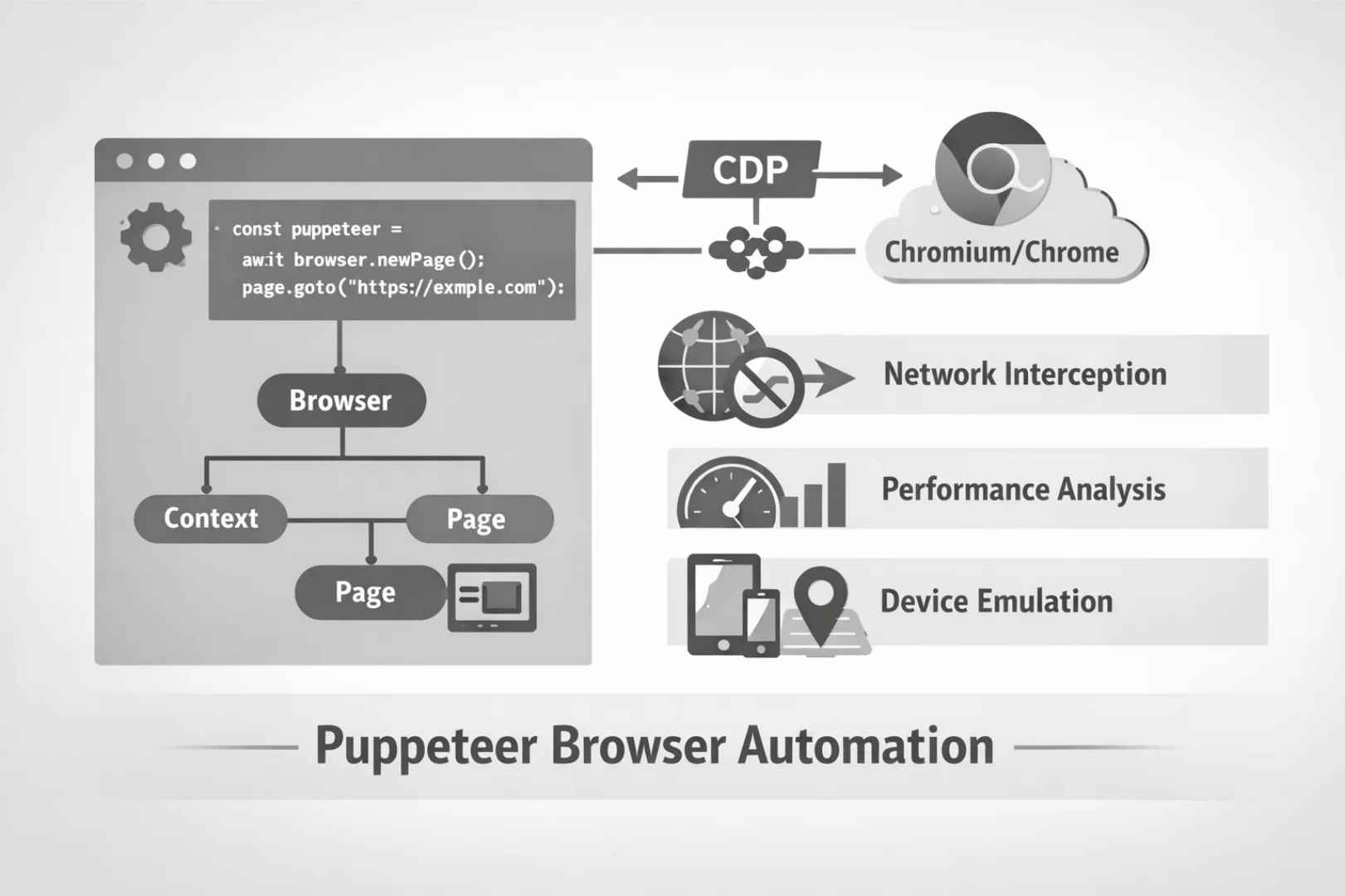
To understand Puppeteer, one must look at its underlying communication layer. It utilizes the Chrome DevTools Protocol (CDP). This is the same protocol used by web inspection tools to debug code and monitor network activity.
When a Puppeteer script executes, it opens a WebSocket connection to the browser. This direct line of communication allows the library to perform actions with near-zero latency. It can observe every event within the browser, from the moment a frame is rendered to the exact millisecond a network request is dispatched.
The Object Hierarchy
Puppeteer organizes its operations through a strict tree-like structure. Understanding this hierarchy is essential for managing memory and ensuring script stability.
- Browser: The root instance representing the actual browser process.
- BrowserContext: An isolated session within the browser. These do not share cookies or storage, making them ideal for parallel testing where data isolation is required.
- Page: Represents a single tab or window. This is the primary interface for DOM interaction.
- Frame: Each page contains a main frame. If a site uses iFrames, Puppeteer treats these as child frames, allowing developers to traverse and interact with nested content.
Advanced Functional Capabilities Puppeteer
Professional application of Puppeteer often goes beyond simple navigation. Its true power lies in its ability to manipulate the browser environment at a granular level.
1. Network Interception and Modification
Puppeteer allows developers to intercept every outgoing request. You can programmatically decide whether to allow a request, abort it, or even provide a mocked response. This is frequently used to block heavy assets like images or advertisements to speed up data extraction, or to simulate API failures during testing.
2. Performance Analysis
The library can generate a comprehensive trace of a page’s execution. By analyzing the “Trace” object, developers can see exactly how much time the browser spends on scripting, rendering, and painting. This data is vital for identifying bottlenecks in complex web applications.
3. Environment Emulation
Testing for a global audience requires simulating various conditions. Puppeteer can override:
- User Agent: To test how a site responds to different browsers or devices.
- Geolocation: To verify that a site correctly displays regional content or currency.
- Display Metrics: To ensure responsive design elements function across mobile, tablet, and desktop resolutions.
Strategic Implementation and Optimization
Deploying Puppeteer in a production environment presents unique challenges, particularly regarding resource allocation.
Memory Management
Each browser instance consumes a significant amount of RAM. To optimize performance, experienced developers use a “Singleton” pattern for the Browser instance and create new BrowserContexts for individual tasks. This reduces the overhead of launching a new process for every operation.
Wait Strategies
The most common cause of automation failure is a “race condition,” where a script tries to click an element that hasn’t loaded yet. Puppeteer solves this with intelligent waiting mechanisms:
- networkidle0: Execution pauses until there are no more than zero active network connections for at least 500ms.
- waitForSelector: The script monitors the DOM and only proceeds once the specified element is present and visible.
Technical Comparison
| Feature | Puppeteer | Legacy Frameworks |
|---|---|---|
| Connection Type | Direct (DevTools Protocol) | Indirect (WebDrivers) |
| Execution Speed | High | Moderate |
| Native Tooling | Built-in PDF/Screenshot | Requires third-party plugins |
| JavaScript Support | Full rendering | Often limited |
Summary of Use Cases
- Continuous Integration (CI/CD): Automatically running UI tests every time code is pushed to a repository.
- Automated Reporting: Navigating to complex data dashboards and exporting the visual state as a high-resolution PDF.
- SEO Auditing: Analyzing how search engine crawlers interpret dynamic, JavaScript-heavy content.
Puppeteer has redefined the boundaries of what is possible with web automation. By providing deep access to the browser’s internal logic, it allows for the creation of robust, scalable, and highly efficient technical workflows.
Also read: