Instagram dropped a new feature on May 13, 2026 called Instants. Within 24 hours, the internet’s main reaction was: how do I turn this off?
Fair. The feature’s instant-send design, where photos go out the moment you tap the shutter with no confirmation screen, has frustrated a lot of
For more context, see our coverage of Quantum Computing 2026 Where We Are.
users who are used to reviewing content before it goes anywhere. If you’ve already accidentally sent something to someone you didn’t mean to, or
you just don’t want a new disappearing-photo inbox cluttering your DMs, this guide covers exactly what to do.
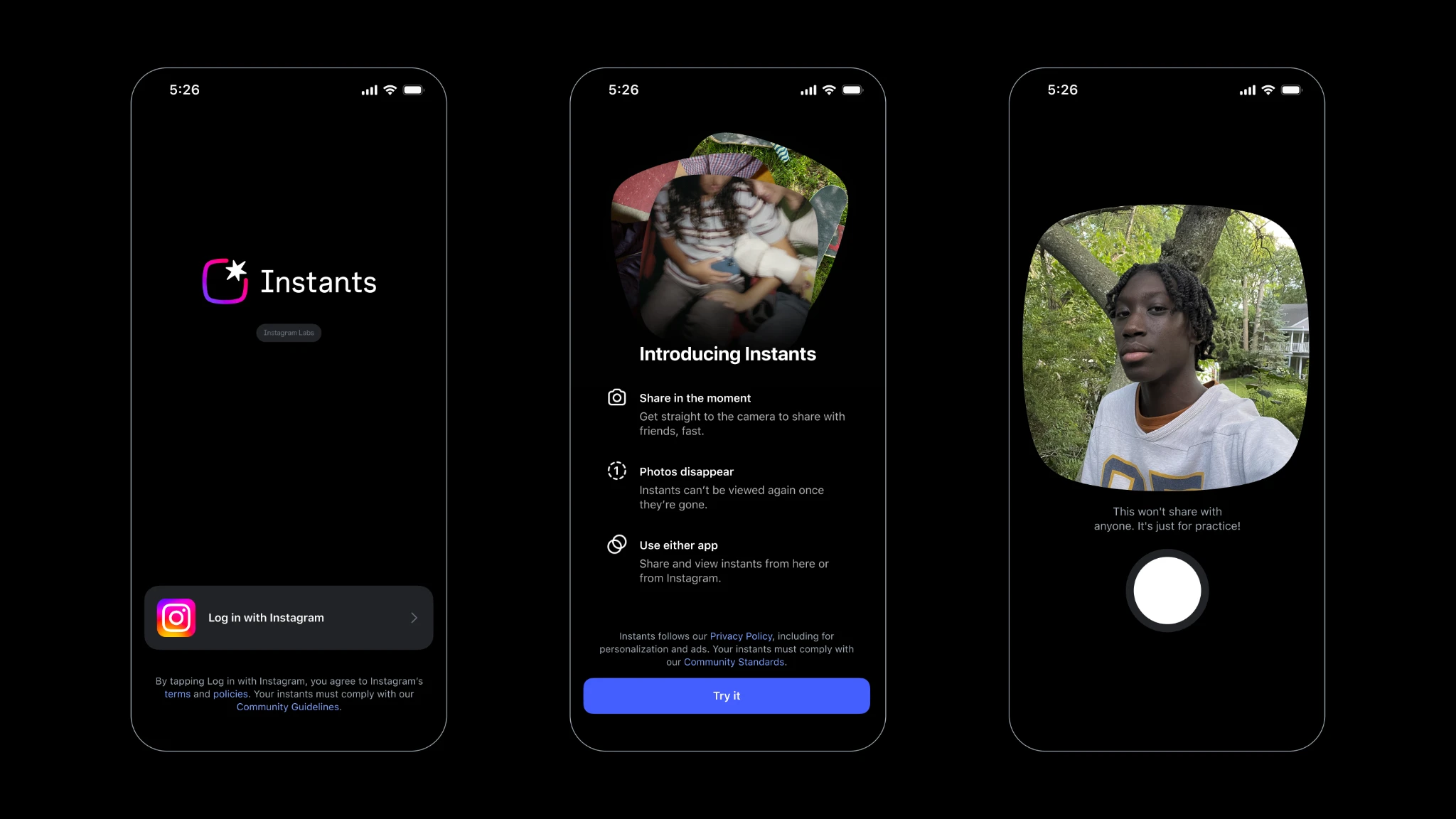
Instants lets you share disappearing photos with your close friends or mutual followers. Photos can be viewed only once and stay available for 24
For more context, see our coverage of Meta 6500 Person AI Unit.
hours if the recipient hasn’t opened them yet. You capture a photo using Instagram’s in-app camera, and you’re not allowed to edit the image.
The format doesn’t allow uploads from your camera roll. You can add text, but that’s it.
What Is Instagram Instants, Exactly?
Recipients cannot screenshot or screen-record Instants you’ve shared. Instagram stores your shared Instants in a private archive that you can access for up to one year.
For more context, see our coverage of How AI Is Changing Healthcare 2026.
You access it via a new photo-stack icon in the bottom-right corner of your Instagram inbox. If you’ve seen a little pile of photos
sitting there and wondered what it is, that’s Instants.
Now, here’s how to make it go away.
Option 1: Fully Hide Instants from Your Inbox (Permanent)
This is the complete off switch. Once you do this, you won’t see the Instants icon in your inbox, and you won’t receive any Instants from other people either.
Step 1: Go to your profile and tap the three-line menu at the top right to open Settings.
Step 2: Scroll down to “Content Preferences.”
Option 2: Snooze Instants Temporarily (Without Disabling Entirely)
Step 3: Toggle on “Hide Instants in Inbox.”
Done. The feature disappears from your inbox entirely. You can reverse this anytime by going back to the same toggle and switching it off.
Not ready to commit to turning it off forever? You can pause it instead.
Option 3: Block or Mute Specific People
Hold down the pile of Instants in your inbox and swipe right to temporarily stop receiving them. Think of it like snoozing a notification.
You’ll stop seeing Instants for a period without changing your settings permanently.
This is useful if you just want a break, or if you’re in a situation where the inbox clutter is annoying but you still want the feature available later.
If the issue isn’t Instants in general but a specific person sending you ones you don’t want, you don’t need to hide the feature altogether.
Already Sent an Instant by Accident? Here’s How to Unsend It
You can choose to block or mute specific people from sending you Instants. This keeps the feature available for everyone else while cutting off
the people you’d rather not hear from via disappearing photos.
To do this, go to that person’s profile and use the standard block or mute options. Blocking them will prevent Instants, along with all
other contact. Muting is the lighter option if you just want to reduce their presence without a full block.
This is the one most people actually need. The feature’s design has understandably frustrated many people, considering photos go out with no confirmation, and their privacy is at stake.
What Happens When You Hide Instants?
The good news: if you’ve accidentally shared an Instant, you can tap the “undo” button to delete it from your archive and unsend it
to friends who haven’t opened it yet.
The key phrase there is “haven’t opened it yet.” Once someone has viewed the Instant, it’s gone from their side (that’s the whole point
of the format), but you can’t pull it back after the fact. Move fast if you sent something to the wrong person.
A few things worth knowing before you flip the switch:
Why Are So Many People Hiding Instants?
You go invisible to Instants senders. If someone sends you an Instant after you’ve hidden the feature, you won’t see it.
They won’t get an error, but their photo will effectively go unviewed and expire after 24 hours.
Your archive stays intact. Hiding Instants from your inbox doesn’t delete anything you’ve already sent or received.
Your archive remains accessible if you change your mind and turn it back on.
You can still use the standalone app. Meta also launched a dedicated standalone Instants app alongside the Instagram feature.
Hiding Instants in your Instagram inbox doesn’t affect the standalone app if you’ve downloaded it separately.
FAQs
Teen accounts have extra protections by default. Parental supervisions for teen accounts on Instagram are automatically applied to Instants, including shared time limits, safety
tools such as a block on screenshots and screen recordings, and restricted access by default between 10PM and 7AM.
The short answer: Instagram trained its users to be careful and deliberate about sharing. Instants works in the exact opposite way.
When you open up Instagram’s new Instants section for the first time, the app opens with a brief introduction about the feature and then
quickly takes you through the process of viewing and reacting, before dropping you straight into the camera.
For a lot of users, a photo went out before they fully understood what they were agreeing to.
The idea is to snap and share photos spontaneously, which is kind of how Instagram used to work way back before it became influencer
central. Whether that nostalgia appeal lands depends entirely on how you use the app. For people who treat Instagram as a broadcast platform or
a portfolio, an unedited disappearing photo feature with no confirmation step is going to feel jarring.
Yes. Go to Settings, then Content Preferences, and toggle “Hide Instants in Inbox.” This removes the feature from your inbox entirely without affecting your relationship with any specific person.
No. Instagram doesn’t notify anyone when you toggle off the feature. If someone sends you an Instant, it will expire after 24 hours without
being opened, but they won’t receive any notification that you’ve hidden the feature.
No. Once a recipient has viewed an Instant, you can’t retrieve it. The undo option only works before the photo has been opened.
Act fast if you sent something by mistake.
No. Your archive of previously shared Instants stays intact for up to one year, regardless of whether you hide the feature.
You can access it again if you turn Instants back on.
No, though they share some DNA. Stories are visible to your followers or friends for 24 hours and can be viewed multiple times.
Instants disappear after being viewed once, can only be sent to close friends or mutuals, cannot be screenshotted, and cannot be edited before sending.
Also read:
Sources and Further Reading
Learn more at TechCrunch.
Learn more at The Verge.
Learn more at Wired.
Related Articles

Trust Post Desk
A journalist and editor at TrustPost.org covering world and national news, technology updates and human-interest stories. They check every fact, interview sources in person or online, and aim to deliver clear, accurate reporting. Their work ranges from breaking news to in-depth features and daily newsletters. Outside the newsroom, they follow emerging trends and engage with readers on social media.