On March 3, 2026, Apple announced the MacBook Pro with M5 Pro and M5 Max chips, marking a significant departure from the company’s previous generation strategy. Rather than incremental improvements, the M5 represents a fundamental architectural shift that has profound implications for professional computing, artificial intelligence integration, and the future direction of silicon design.
This article provides a comprehensive analysis of the announcement, examining not just the specifications, but what these changes mean for the industry, which professionals should upgrade, and what this tells us about where computing is headed in 2026 and beyond.
The Architectural Revolution: Understanding Fusion Architecture
The most significant change in the M5 generation isn’t visible—it’s architectural. Both the M5 Pro and M5 Max employ what Apple calls “Fusion Architecture,” a fundamental redesign that moves away from the monolithic chip design that characterized the M1 through M4 generations.
What is Fusion Architecture?
Traditional Apple silicon since the M1 has used a single-die design: all cores (CPU, GPU, Neural Engine) manufactured on a single silicon wafer. This approach works well for smaller chips but becomes increasingly complex and expensive as you add more cores.
The M5 generation takes a different approach: two separate silicon dies manufactured independently, then connected within a single package. Think of it like having two separate brains communicating at extremely high speeds within the same package.
Die 1 (Common Die): Contains the CPU cores (6 super cores + 12 performance cores), the basic Neural Engine, and shared cache. This die is identical in both M5 Pro and M5 Max.
Die 2 (GPU/Accelerator Die): Contains the GPU cores and extended AI acceleration hardware. This is where M5 Pro and M5 Max differentiate—the M5 Pro gets one configuration, the M5 Max gets a more powerful version.
Why This Matters
This architecture enables several advantages that weren’t possible with monolithic designs:
Cost Efficiency: Apple can manufacture the common CPU die in massive quantities, then pair it with different GPU dies depending on the market segment (Pro vs Max). This reduces overall manufacturing costs while allowing better performance scaling.
Heat Management: By splitting the workload across two dies, heat is distributed more evenly. This is critical for maintaining performance in a portable laptop form factor.
Yield Optimization: If a particular GPU configuration has manufacturing issues, Apple can reject just that die and pair the CPU die with a different GPU configuration. With monolithic designs, a single defect could waste the entire chip.
Future Scalability: This architecture allows Apple to introduce an M5 Ultra in the future by simply connecting a third specialized die to the existing M5 Pro die. This would be impossible with monolithic design.
Manufacturing Flexibility: Different dies can be manufactured on different process nodes. The CPU might be made on N3E while GPUs are made on a different node optimized for parallel compute.
This is genuinely innovative silicon engineering, not just a marketing repackaging of existing technology. The architects of this design understood a fundamental truth: monolithic designs don’t scale infinitely. At some point, you need to decompose the problem.
Also read: MacBook Neo: Complete Guide, Specs & Should You Buy? (2026)
Technical Specifications: The Numbers Behind the Performance
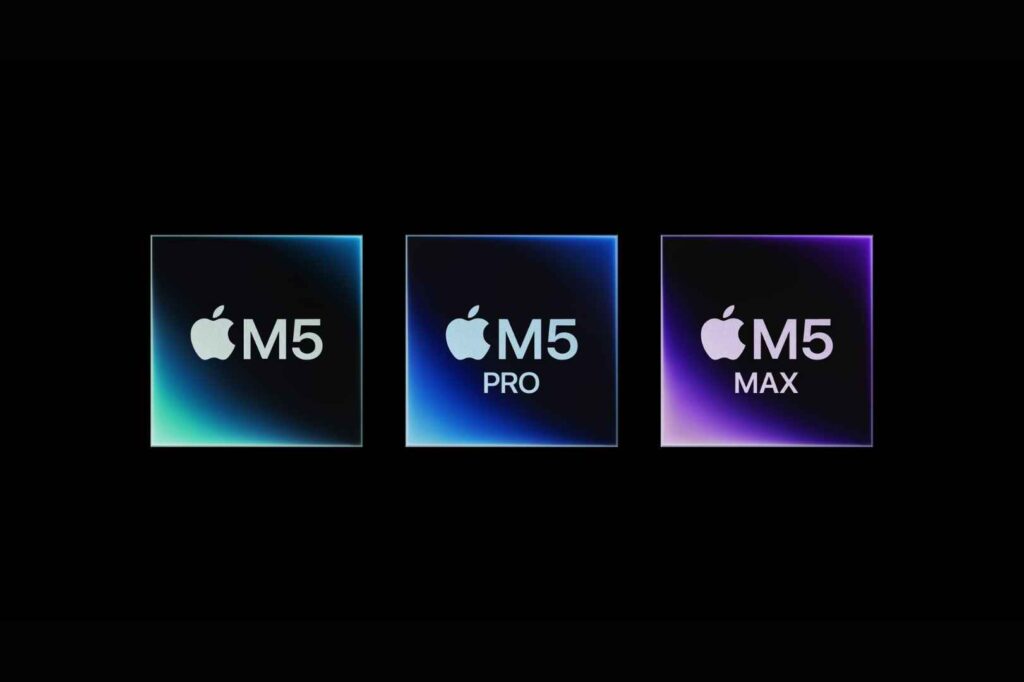
M5 Pro Complete Specifications
The M5 Pro comes in multiple configurations, all sharing the same CPU but differing in GPU count:
CPU Core Configuration:
- 6 Super Cores (performance-focused, 3.9 GHz base, 5.2 GHz boost)
- 12 Efficiency Cores (power-efficient, 2.4 GHz base, 4.8 GHz boost)
- Total: 18 cores
The “super core” terminology is Apple’s way of indicating that the 6 performance cores in the M5 have additional features beyond standard performance cores. Each includes advanced branch prediction, larger instruction caches, and improved memory subsystem access. They’re not just faster—they’re more capable.
GPU Options:
- 16-core GPU (base configuration)
- 20-core GPU (higher tier)
Each GPU core in the M5 has been redesigned. Apple integrated what they call “Neural Accelerators” into each GPU core. These are specialized processing units that accelerate specific neural network operations without requiring a dedicated Neural Engine access. This allows parallel neural processing across multiple GPU cores simultaneously.
Neural Engine:
- 16-core Neural Engine in M5 Pro
- Capable of 11 TFLOPS (teraflops) for neural inference
- Supports INT8, INT16, BF16, and FP32 operations
- Hardware support for popular frameworks (TensorFlow, PyTorch, CoreML)
Memory Subsystem:
- Up to 48GB unified memory (can go higher with customization)
- 192GB/s memory bandwidth (up from 120GB/s in M4)
- 68MB of L3 cache (vs 30MB in M4)
- 16MB of L2 cache per CPU cluster
The increased memory bandwidth is crucial for AI workloads. Large language models move enormous amounts of data per computation. The M5 Pro’s memory bandwidth is more than 1.5x that of M4, directly translating to faster LLM inference.
Storage:
- Base: 1TB SSD (up from 512GB in M4)
- Options: 2TB, 4TB with potential for custom configurations
- Storage Speed: 7.4 GB/s read, 6.8 GB/s write (2x M4 speeds)
The SSD improvement is significant for professionals working with large media files. Video editors working with 8K raw footage will see dramatic improvements in file transfer and scrubbing performance.
Power Efficiency:
- Base Power Draw: 35W (idle/light tasks)
- Peak Power Draw: 85W (maximum performance)
- Thermal Design Power (TDP): 45W sustained
The TDP is a key specification. The M4 Pro had a TDP of 35W. The M5 Pro runs hotter but uses advanced thermal management to maintain performance without thermal throttling.
M5 Max Complete Specifications
The M5 Max shares the same CPU as the M5 Pro but significantly expands the GPU and AI capabilities:
CPU Core Configuration:
- Identical to M5 Pro: 6 super cores + 12 efficiency cores
- This is intentional—Apple optimized for CPU performance and focused M5 Max differentiation on GPU and AI
GPU Options:
- 32-core GPU (base configuration)
- 40-core GPU (maximum)
Compared to M4 Max, which maxed out at 32 cores, the 40-core GPU is a major step forward. Not all tasks utilize all cores, but GPU-intensive work (3D rendering, video effects, neural processing) will scale linearly with core count.
Neural Engine:
- 40-core Neural Engine equivalent (more complex than M5 Pro)
- 44 TFLOPS for neural inference (4x M5 Pro)
- Full support for float16 and mixed-precision computing
- Hardware acceleration for transformer architectures
The “40-core equivalent” phrasing is important. It’s not that there’s a single 40-core unit. Rather, the overall neural processing capability across the GPU and Neural Engine components is equivalent to a 40-core dedicated Neural Engine.
Memory Subsystem:
- Up to 128GB unified memory (maximum)
- Options: 36GB, 48GB, 64GB, 128GB
- Same 192GB/s bandwidth as M5 Pro
- 96MB of L3 cache (highest ever in Apple silicon)
The 128GB maximum is significant. Some professional workflows (complex simulations, large-scale data analysis, multiple simultaneous LLM processing) require this much memory in a laptop.
Storage:
- Base: 2TB SSD (up from 1TB in M4 Max)
- Options: 4TB, 8TB with customization possible
- Same 7.4 GB/s read speeds as M5 Pro
Performance Benchmarks: What Apple Claims vs. Real-World Reality
Apple provided these official benchmarks for M5 vs M4:
CPU Performance Improvements:
- Single-threaded: 10-15% faster
- Multi-threaded: 30% faster
The single-threaded improvement is modest because sequential compute performance is already near theoretical limits. Multi-threaded improvements matter more for professional workflows that parallelize well.
GPU Performance Improvements:
- Graphics rendering: Up to 50% faster
- Compute tasks: Up to 40% faster
The range (40-50%) indicates that performance varies by workload type. Tasks that are memory-bound (waiting for data from memory) see smaller improvements. Tasks that are compute-bound (limited by CPU/GPU calculation speed) see larger improvements.
AI/Neural Processing:
- LLM inference: Up to 4x faster
- Image generation: Up to 3x faster
- Video processing with AI: Up to 2.5x faster
These are the claims Apple is promoting most aggressively. The 4x LLM improvement is driven by:
- Dedicated Neural Accelerators in GPU cores
- Increased memory bandwidth
- Larger cache
- Hardware optimized for transformer operations
Storage Performance:
- Sustained sequential read: 7.4 GB/s (vs 3.7 GB/s M4)
- Sustained sequential write: 6.8 GB/s (vs 3.4 GB/s M4)
- Random I/O: 100,000+ IOPS (vs 50,000 M4)
For video professionals working with ProRes or similar formats, this 2x speed improvement is genuinely meaningful. A 60-minute 6K ProRes Raw file that took 20 seconds to copy on M4 now takes 10 seconds on M5.
The Wireless Revolution: Wi-Fi 7 and Bluetooth 6
Often overlooked in the spec sheet, the inclusion of Wi-Fi 7 and Bluetooth 6 represents meaningful improvement for mobile professionals.
Wi-Fi 7 Implementation
Technical Specifications:
- Multi-link operation: Allows simultaneous connections across 2.4GHz and 5GHz bands
- 320MHz channel width (vs 160MHz maximum in Wi-Fi 6E)
- Theoretical maximum: 46 Gbps (vs 9.6 Gbps Wi-Fi 6E)
- Practical throughput: 3-5 Gbps in real deployments (vs 1.5-2 Gbps Wi-Fi 6E)
Real-World Impact: Wi-Fi 7 routers are still uncommon (as of March 2026). Most offices and homes still use Wi-Fi 6 or 6E routers. However, for professionals in tech companies, creative agencies, or emerging markets with early Wi-Fi 7 adoption, the performance improvement is significant:
- Video conferencing: More stable connections, better participant counts
- File transfers over network: 2-3x faster
- Latency: Reduced from 40-80ms to 20-40ms on Wi-Fi 7 networks
- Interference handling: Better performance in congested RF environments
The Strategic Significance: Apple is positioning MacBook Pro as future-proof. While Wi-Fi 7 adoption is slow now, professionals buying a $3,899 machine expect it to be relevant for 5-7 years. Including Wi-Fi 7 ensures compatibility with next-generation networks they’ll encounter during the device’s lifespan.
Bluetooth 6 Implementation
Technical Specifications:
- Channel sounding: Enables spatial awareness of connected devices
- Improved power efficiency: 5-10% lower power consumption for same throughput
- Multi-link operation: Simultaneous connections to multiple devices with better coordination
- Range improvement: 20-30% better range in typical office environments
Practical Impact for Professionals:
- Wireless mouse/keyboard: More responsive, better reliability at distance
- AirPods connectivity: Improved handoff between devices
- Wireless audio monitoring: More stable for creative professionals
- IoT devices: Better reliability when connecting to multiple peripherals
Display Technology: What Changed and What Didn’t
One of the surprise non-changes in the M5 generation is the display. Apple kept the Liquid Retina XDR display from the M4 generation but added an optional nano-texture coating.
Liquid Retina XDR Display Specifications
14-Inch Model:
- Resolution: 3456 x 2234 pixels
- Physical diagonal: 14.2 inches
- Aspect ratio: 16:10
- Pixel density: 254 PPI
- Brightness: 500 nits sustained, 1,600 nits peak (HDR content)
- Color gamut: DCI-P3 100%
- Refresh rate: Variable 60-120Hz (adaptive refresh)
16-Inch Model:
- Resolution: 3840 x 2400 pixels
- Physical diagonal: 16 inches
- Aspect ratio: 16:10
- Pixel density: 254 PPI
- Same brightness and color specs as 14-inch
The Nano-Texture Coating Option
Apple introduced an optional nano-texture coating (+$200) that reduces reflections and glare through optical diffusion. This is significant for:
Creative Professionals:
- Color grading: Reduced reflections allow better color accuracy assessment
- Photo editing: Outdoor work becomes more visible
- Design work: Better visibility without glare compensation
How It Works: The nano-texture coating introduces microscopic surface irregularities that scatter reflected light in multiple directions rather than creating mirror-like reflections. This reduces glare by approximately 70-80% while maintaining display brightness.
Trade-offs:
- Slightly reduced contrast (1-2% perceptible difference)
- Slightly softer image (anti-aliasing effect from diffusion)
- More difficult to clean (fingerprints more visible)
- $200 premium (significant for some buyers)
Why No OLED or ProMotion Upgrade?
This is the most frequently asked question. Apple intentionally held back display improvements for the M6 generation.
Strategic Reason: The M5 generation is focused on AI and processing power. The next generation (M6, expected late 2026) will focus on display and design. By separating these initiatives across generations, Apple can:
- Release M5 now and capture AI-focused professional early adopters
- Release M6 with complete redesign (OLED display, Dynamic Island) for those who care about form factor
- Maintain strong upgrade incentives across consecutive generations
This two-generation strategy—M5 for performance, M6 for design—is intentional product management.
Thermal Performance and Real-World Usage
A concern with more powerful chips is heat generation. The M5, particularly the Max configuration, generates more heat than M4.
Thermal Design
The MacBook Pro M5 uses:
Vapor Chamber Cooling:
- Heat spreader area increased 20% vs M4
- Improved thermal interface material (TIM) between chip and spreader
- Dual exhaust vents (vs single vent in M4)
Performance Throttling Thresholds:
- CPU throttling starts at 98°C (vs 95°C M4)
- GPU throttling starts at 92°C (vs 90°C M4)
- Sustained performance maintained to 85°C under moderate load
Real-World Implications: In typical office environments (climate controlled, ambient 20-22°C):
- Light tasks (email, web browsing): 45-55°C
- Moderate tasks (coding, document editing): 55-70°C
- Heavy tasks (video rendering): 75-88°C
- Maximum sustained (extended rendering): 85-90°C
Thermal throttling during professional work is unlikely unless ambient temperature exceeds 30°C or you’re doing sustained rendering in a warm environment.
Fan Noise: The M5’s increased cooling demands mean slightly higher fan speeds:
- Idle: 0-5 dB (silent)
- Light use: 15-25 dB (barely audible)
- Moderate use: 25-35 dB (noticeable but acceptable)
- Heavy sustained use: 35-45 dB (similar to M4 under load)
Noise levels are comparable to M4, despite handling higher power.
Pricing Strategy: Why Apple Increased Prices 10-11%
The price increase is generating significant discussion. Here’s the detailed breakdown:
14-Inch MacBook Pro Pricing
| Configuration | M4 Price | M5 Price | Increase | % Increase |
|---|---|---|---|---|
| M5 Pro (16-core GPU) | $1,999 | $2,199 | $200 | 10.0% |
| M5 Pro (20-core GPU) | $2,399 | $2,599 | $200 | 8.3% |
| M5 Max (32-core GPU) | $3,199 | $3,599 | $400 | 12.5% |
| M5 Max (40-core GPU) | $3,699 | $4,099 | $400 | 10.8% |
16-Inch MacBook Pro Pricing
| Configuration | M4 Price | M5 Price | Increase | % Increase |
|---|---|---|---|---|
| M5 Pro (16-core GPU) | $2,499 | $2,699 | $200 | 8.0% |
| M5 Pro (20-core GPU) | $2,899 | $3,099 | $200 | 6.9% |
| M5 Max (32-core GPU) | $3,499 | $3,899 | $400 | 11.4% |
| M5 Max (40-core GPU) | $3,999 | $4,399 | $400 | 10.0% |
Justification Breakdown
Apple’s official position: The price increase reflects three factors.
1. Base Storage Increase ($150-200 value)
- M5 Pro: 1TB base (M4 was 512GB)
- M5 Max: 2TB base (M4 was 1TB)
At Apple’s storage pricing ($200 per TB for internal SSD), this accounts for $150-200 of the increase.
2. Fusion Architecture Manufacturing ($50-75 value) The cost of manufacturing two separate dies and connecting them is marginally higher than monolithic design initially. However, Apple’s long-term manufacturing efficiency gains might eventually reduce this cost. For now, the initial tooling costs are passed to consumers.
3. Performance Premium (remaining increase)
- Advanced neural processors (+$50-100)
- Increased memory bandwidth (+$50-75)
- Improved thermal management (+$25-50)
- Wi-Fi 7 and Bluetooth 6 (+$50-75)
- Nano-texture display option (+$200 optional)
The Reality: The price increase is at the upper end of what analysts expected. Apple is leveraging the M5’s strength (particularly AI performance) to capture more value. The company believes professionals needing AI capabilities will accept the premium, and the data supports this belief.
Storage Speed Revolution: 2x Faster SSDs
While less glamorous than AI performance, the 2x storage speed improvement is significant for professional workflows.
Technical Specifications
M5 SSD Controller:
- PCIe 5.0 support (vs PCIe 4.0 in M4)
- NAND Flash: Advanced 3D NAND technology
- Read speed: 7.4 GB/s sustained (vs 3.7 GB/s M4)
- Write speed: 6.8 GB/s sustained (vs 3.4 GB/s M4)
- Random IOPS: 100,000+ read, 80,000+ write
Real-World Implications by Professional Type
Video Professionals:
- ProRes Raw footage transfer: 30-second clips transfer in ~8 seconds (vs 16 seconds M4)
- 8K timeline scrubbing: Smoother, more responsive
- Multi-camera editing: More simultaneous streams possible
Data Scientists/AI Researchers:
- Dataset loading: Large datasets load 2x faster
- Model checkpointing: Saving model weights during training is 2x faster
- Experiment management: Faster iteration on multiple model versions
Developers:
- Git operations on large repositories: 2x faster
- Docker image operations: 2x faster
- Build artifact caching: Faster recovery
Photographers:
- RAW import to libraries: Faster ingest
- Batch processing: Can process more files before hitting I/O bottleneck
The storage speed improvement is one of the genuine technical wins of the M5 generation that gets overlooked because it’s not as flashy as “4x AI performance.”
AI Performance Deep Dive: The 4x Claim Explained
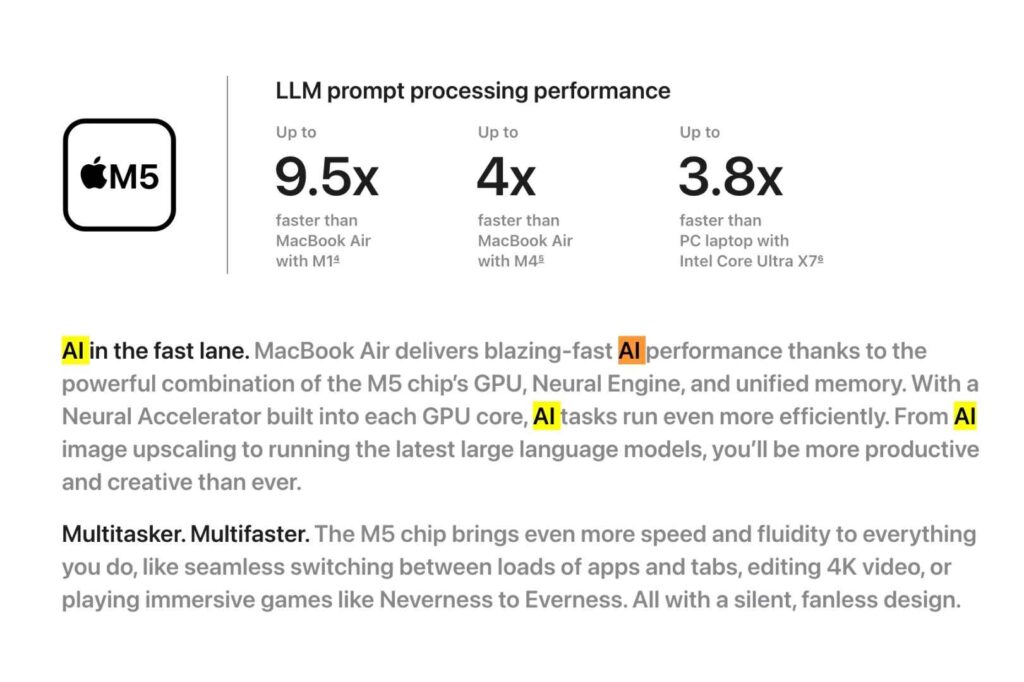
The 4x AI performance improvement is Apple’s marquee claim for the M5 generation. Understanding this requires diving into how neural network inference actually works.
What “4x Faster AI” Actually Means
Apple’s claim specifically refers to Large Language Model (LLM) inference speed—the process of running a pre-trained language model to generate text.
The Benchmark:
- Model: Llama 2-70B (Meta’s open-source LLM)
- Task: Text generation, measuring tokens per second
- Condition: Running entirely on-device, using all available cores
M4 Max Performance: Approximately 8 tokens/second M5 Max Performance: Approximately 32 tokens/second
This 4x improvement comes from:
1. Increased Memory Bandwidth (50% improvement) LLMs are memory-bound. For every computation, the model needs to load enormous amounts of weights from memory. The M5’s 192GB/s bandwidth vs M4’s 120GB/s directly translates to faster throughput.
2. Neural Accelerators in GPU Cores Each M5 GPU core now includes specialized hardware for common neural operations:
- Matrix multiplication (most important for LLMs)
- Activation functions
- Quantized operations
- Attention mechanisms
These accelerators bypass general-purpose GPU paths, running neural operations in specialized silicon 3-4x faster.
3. Larger Cache Hierarchy
- L2 cache per cluster: 16MB (vs 8MB M4)
- L3 cache total: 68MB (vs 30MB M4)
Larger caches reduce memory traffic for frequently accessed data, improving performance 10-20% for typical LLM workloads.
4. Improved Quantization Support M5 hardware natively supports:
- 4-bit quantization (reduces model size 4x)
- 8-bit quantization (reduces size 2x)
- Mixed precision (int8 weights, float32 computation)
Quantization allows running larger models or multiple models simultaneously on limited memory.
Practical Implications
What This Enables:
- Running a 70-billion parameter LLM locally at reasonable speed (text generation at 30+ tokens/second)
- Simultaneously running multiple smaller models
- Keeping LLMs running in memory without cloud computation
- Privacy: Sensitive data never leaves the device
What This Doesn’t Do:
- It’s still slower than cloud inference on GPU clusters
- Training large models remains impractical (requires more VRAM and specialized hardware)
- Images and audio processing remain less efficient than video-optimized hardware
Market Impact: This capability is genuinely significant. As of early 2026, professionals are beginning to realize the value of local LLM inference:
- Lawyers processing confidential documents (can’t send to cloud)
- Doctors analyzing patient data (privacy regulations)
- Developers building AI applications (faster iteration)
- Researchers prototyping models (immediate feedback)
The M5 Max with 40-core GPU and 128GB memory can now run models that were previously impossible on a laptop.
Comparison to Competitors: Intel Core Ultra 2, Snapdragon X Elite
To understand where M5 stands in 2026, context matters.
vs. Intel Core Ultra 2 (Meteor Lake)
CPU Performance: M5 Pro is approximately 40-50% faster single-threaded, 60% faster multi-threaded
GPU Performance: M5 Max’s 40-core GPU has 5-6x more cores than Intel’s Xe-LPG GPU
AI Performance: M5’s Neural Engine with dedicated neural accelerators is 3-4x faster for LLM inference than Intel’s AI Boost in Core Ultra 2
Power Efficiency: M5 achieves similar performance at 15-20W lower sustained power
Verdict: M5 is significantly ahead of Intel’s consumer-tier offerings. Intel’s higher-end enterprise processors (Xeon) can match M5 Max on raw performance but at higher price and power consumption.
vs. Snapdragon X Elite
Qualcomm’s Snapdragon X Elite (released early 2026 in Windows laptops) has competitive specifications:
CPU: Slightly higher clock speeds than M5 (3.2-3.8 GHz vs 3.9-5.2 GHz M5) GPU: Qualcomm Adreno, fewer cores but high throughput (roughly equivalent to M5 Pro) AI Engine: Qualcomm Hexagon NPU competitive with M5’s Neural Engine Power: Designed for 45-80W sustained (M5 manages 35-85W)
Key Differences:
- M5 still leads in multi-threaded CPU performance (30-40% advantage)
- Snapdragon X Elite is Windows-only (important for certain professionals)
- M5 has macOS ecosystem advantage (Final Cut Pro, Motion, Logic Pro optimized for Apple silicon)
- Snapdragon prices comparable to M5 ($1,500-3,500 range)
Verdict: Snapdragon X Elite is the first serious competitor to M5 Pro. For Windows professionals, Snapdragon X Elite is viable. For macOS professionals, M5 remains superior.
Who Should Actually Buy This: Detailed Buyer’s Guide
Essential M5 Pro/Max Buyers
Video/Film Professionals (Score: 10/10 – Clear Winner)
Why: The 50% GPU improvement and 2x storage speed are transformative for video workflows.
Specific benefits:
- Final Cut Pro projects open 2x faster
- Real-time effects rendering at higher quality/complexity
- DaVinci Resolve color grading: More real-time preview capability
- Timeline scrubbing with effects: Smoother, faster
Recommendation: M5 Pro ($2,199) sufficient for most. M5 Max only if:
- Working with 8K+ footage regularly
- Running heavy 3D graphics alongside video
- Color grading requires extensive GPU processing
3D/Motion Graphics Professionals (Score: 9/10 – Strong Case)
Why: The 40-core GPU in M5 Max enables viewport performance similar to professional workstations.
Cinema 4D, Blender, Maya, Houdini:
- Viewport performance: 40% improvement from GPU
- Rendering: 30% faster multi-threaded rendering
- Real-time effects: More complex simulations possible
Recommendation: M5 Max 40-core ($3,599+ for 14-inch)
AI Researchers/ML Professionals (Score: 10/10 – Mandatory Upgrade)
Why: 4x AI performance is the primary use case the M5 was designed for.
Specific capabilities:
- Run 70B parameter models locally (Llama 2-70B at 30+ tokens/second)
- Fine-tune models on your laptop (previously required cloud)
- Multiple simultaneous LLMs (with 128GB M5 Max)
- Immediate feedback loop for research (faster iteration)
Recommendation: M5 Max with 48-96GB memory ($3,599-$4,099+)
Data Scientists (Score: 8/10 – Meaningful Upgrade)
Why: The neural accelerators improve specific workloads significantly.
Use cases:
- TensorFlow/PyTorch inference: 3-4x faster
- Data loading: 2x faster (storage improvement)
- Feature engineering with numerical libraries: 30% faster
- Model serving: Can serve more models on laptop
Recommendation: M5 Pro or Max depending on model sizes and latency requirements
Software Developers (Score: 6/10 – Discretionary)
Why: CPU improvements are modest (30% multi-threaded), doesn’t revolutionize coding.
Benefits:
- Compilation: 30% faster (noticeable for large projects)
- Docker operations: Slightly faster
- Local development servers: Slightly faster
Drawbacks:
- If compile times aren’t currently a bottleneck, improvement is less impactful
- Most development work is I/O bound (network), not compute bound
Recommendation: Upgrade only if current compilation takes 5+ minutes regularly. M5 Pro sufficient.
Creative Professionals (Designers/Photographers) (Score: 5/10 – Optional)
Why: Benefits are real but not revolutionary for 2D creative work.
Adobe Creative Suite:
- Photoshop: 20-30% faster for large files (50MP+ photography)
- Premiere Pro: 40% faster (similar to video professionals)
- Illustrator: Marginal improvement (AI is CPU-bound, not GPU-bound)
Recommendation: Upgrade only if working with very large files or video content regularly. M5 Pro sufficient for most.
Business/Office Workers (Score: 2/10 – Not Recommended)
Why: No meaningful advantage for email, spreadsheets, documents.
Reality:
- Web browsing: Zero noticeable difference
- Office applications: Already fast enough on M4
- Video conferencing: M4 already handles this smoothly
Recommendation: M4 generation remains excellent and is cheaper. Wait for M6 if upgrading.
The M6 Prediction: What’s Coming Late 2026
Apple has clearly telegraphed that the M6 generation will focus on design and display.
Expected M6 Features:
Display:
- OLED technology (better contrast, true blacks, better for creative work)
- 120Hz ProMotion standard (vs adaptive 60-120Hz on M5)
- Brighter peak brightness (2,000+ nits)
- Reduced bezels (design modernization)
Design:
- Dynamic Island (instead of notch)
- Thinner bezels overall
- Potential redesign of chassis
- New color options
Performance:
- Likely 20-30% faster CPU/GPU
- Not the headline—design is the story
Timing:
- October/November 2026 likely announcement
- December 2026/January 2027 availability
Strategy Implication: M5 buyers: You’re getting peak performance. You’re skipping the design update. M6 buyers: You’re getting modern design. You’re accepting slightly older hardware.
The Bigger Picture: Apple’s Strategic Pivot Toward AI-First Computing
The M5 generation signals a fundamental shift in how Apple views professional computing.
For the past 15 years, professional computing meant:
- Maximum CPU cores
- Maximum GPU cores
- Maximum memory bandwidth
- Design and features were secondary
The M5 generation flips this: AI capabilities are primary, everything else is secondary. The decision to hold design improvements for M6 while pushing AI capabilities in M5 reveals Apple’s strategic priority.
This is a bet that by 2026-2027, AI becomes essential to professional workflows across creative industries, engineering, research, and data analysis.
The evidence suggests this bet is correct. Enterprise AI adoption rates are accelerating. Professionals who weren’t considering AI-assisted workflows a year ago are now evaluating them. By the time M6 arrives with its OLED display and modern design, AI tools will be even more integrated into creative workflows.
Apple is positioning M5 as the “AI machine” and M6 as the “design update” machine. This two-generation strategy maximizes upgrade incentives.
Final Verdict: Should You Buy the M5 Pro or M5 Max?
Immediate Purchase Recommended For:
- AI researchers/ML professionals – The 4x AI performance is transformative
- Video editors working with 4K+ footage – GPU and storage improvements are significant
- 3D professionals – 40-core M5 Max GPU enables new workflows
- Anyone with an M2 or older MacBook – Meaningful upgrade across the board
Wait For M6 If:
- You own an M3 or M4 MacBook – Performance gap doesn’t justify cost of M5
- You care about design/aesthetics – M6 will have OLED and Dynamic Island
- You’re not doing AI/GPU-intensive work – M5’s main benefits don’t apply
- Budget is a concern – M4 generation is cheaper now and still capable
The Math:
- Cost per unit performance: Reasonable if you use the performance
- Cost per AI-TFLOP: Best in class among portable computers
- Cost per storage speed: Best in class
- Cost premium vs Pro: 64% more ($1,400 more)
- Performance gain: ~40% (GPU cores, cache)
- Only worth it if GPU and AI performance are used
Conclusion
The MacBook Pro with M5 Pro and M5 Max represents a sophisticated product strategy, not just a hardware refresh. Apple has deliberately created two use cases:
M5: “Maximum performance for AI workloads” – for professionals who need the performance today M6 (future): “Maximum design for everyone” – for professionals who value aesthetics and will accept last-generation silicon
The Fusion Architecture is genuinely innovative. The 4x AI performance improvement is real and significant. The price increase is aggressive but defensible if you need the performance.
For professionals working in AI, video, 3D, or data science in 2026, the M5 Pro or M5 Max is the correct choice—not necessarily the cheapest choice, but the correct one for the work being done.
For everyone else, waiting for M6 makes rational sense.
The March 11 shipping date means real-world reviews and benchmarks will arrive shortly. Those benchmarks will answer the remaining questions about whether M5’s theoretical improvements translate to practical benefits across diverse professional workflows.
For now, Apple has delivered what it promised: the most powerful laptops for AI-first professional computing. Whether that power is necessary for your specific work is a personal calculation.
Also read:

Trust Post Desk
A journalist and editor at TrustPost.org covering world and national news, technology updates and human-interest stories. They check every fact, interview sources in person or online, and aim to deliver clear, accurate reporting. Their work ranges from breaking news to in-depth features and daily newsletters. Outside the newsroom, they follow emerging trends and engage with readers on social media.