
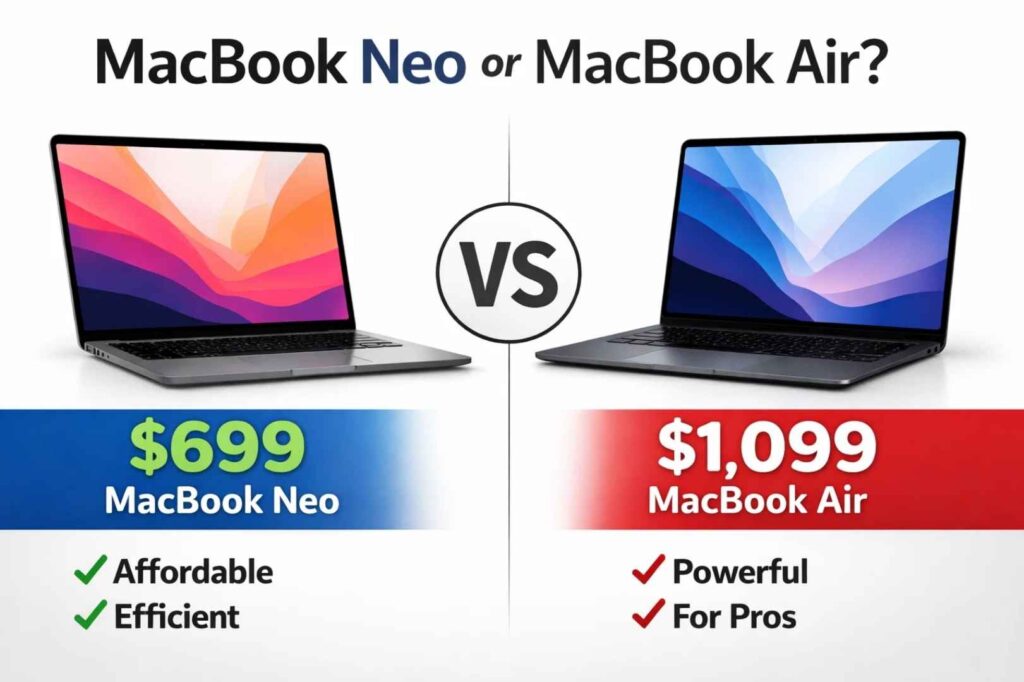
Apple just released the MacBook Neo at $699, and immediately buyers are asking the obvious question: should I save $400 and buy the Neo, or spend more on the MacBook Air at $1,099?
The answer isn’t as simple as “Air is better” because these are fundamentally different machines built for different people.
Understanding the difference requires looking past the specs and at what each machine is actually designed to do.
The MacBook Neo uses an A18 Pro chip—the same processor found in the iPhone 17 Pro. The MacBook Air uses an M4 or M5 chip, processors specifically engineered for laptop computing.
The Core Difference: Two Different Philosophies
This single choice cascades into real differences in how these machines perform. The A18 Pro prioritizes efficiency and battery life.
It’s designed to do everyday computing tasks quickly without consuming significant power. The M-series chips prioritize sustained performance.
They’re designed to handle intensive tasks for extended periods without slowing down.
Think of it this way: the Neo is like a marathon runner who’s incredibly efficient with energy.
The Air is like a sprinter who can maintain peak speed for longer. Different design philosophies, different strengths.
The specs look similar. The performance, however, tells a different story.
Quick Specs at a Glance
If you open a web browser and load Google, both MacBooks feel identical. Web pages load at the same speed. The responsiveness is the same. You can’t tell them apart.
The difference appears when you push the machine hard. Let’s say you’re exporting a 4K video in Final Cut Pro.
On the MacBook Neo, that video render takes about 40 minutes. On the MacBook Air, the same video renders in 10 minutes.
That’s a 4x performance advantage.
Or imagine you’re a software engineer compiling a large project. The Neo handles it, but it takes noticeably longer than the Air.
If you do this 10 times a day, the Air saves you hours every week.
Performance: Where the Real Difference Appears
The reason comes down to thermal design. The Air is built to maintain performance even under sustained heavy load.
The Neo prioritizes being thin and quiet, which limits its cooling capacity. Under heavy sustained work, the Neo’s performance throttles to stay cool.
This is intentional—the Neo isn’t designed for extended heavy processing.
For everyday computing—browsing, email, document editing, video conferencing—both machines handle everything smoothly. The performance advantage of the Air simply doesn’t matter for these tasks.
Apple claims the Neo gets 16 hours and the Air gets 18 hours. These are optimistic numbers measured under very light conditions.
Battery Life in Real-World Usage
In real-world testing with typical computing tasks, the Neo achieves 10-13 hours and the Air gets 12-15 hours. The difference is real but modest—roughly 2-3 hours depending on your workload.
However, this story changes under heavy load. If you’re rendering video or doing intensive creative work, the Neo’s battery drains noticeably faster.
This happens because the machine is working harder to compensate for its thermal limitations. The Air maintains consistent battery performance regardless of task intensity.
For a student spending a full day at campus doing light work—browsing classes, taking notes, video conferencing—both machines easily last a full day without charging. Battery life differences are irrelevant in this scenario.
Design and Build Quality: They’re Basically Identical
Both MacBooks use the same design language: aluminum unibody construction, premium feel, excellent keyboard, responsive trackpad. If you closed your eyes and used both for 5 minutes, you probably couldn’t tell them apart by touch alone.
The Neo is technically thinner (0.48 inches vs 0.44 inches), but the difference is imperceptible in real life.
Both are roughly the same weight at 2.7 pounds. Both feel premium and portable.
The main design difference is screen size options. The Neo comes only with a 13-inch display. The Air offers both 13-inch and 15-inch options.
If you do a lot of multitasking or design work, the larger 15-inch Air provides genuine workflow improvement.
For single-app work (writing, coding, email), screen size doesn’t matter much.
Storage and Memory: No Meaningful Difference
Both come with 8GB of RAM as base configuration. Both offer 256GB or 512GB storage options. Both allow upgrades to higher specs.
For most users, base specs are sufficient. Students taking notes, casual users browsing the web, light creative workers—all handle base specs without issues.
Professional creative workers doing heavy multitasking benefit from upgrading to 16GB RAM, which is available on both machines.
The real difference in memory matters only if you do professional work that demands it. For typical usage, you won’t notice the difference between
Neo and Air based on RAM or storage alone.
Ports and Connectivity: Exactly the Same
Both have two Thunderbolt 4/USB-C ports. Both support WiFi 6E and Bluetooth 5.3. Neither has HDMI, USB-A, or SD card slots. Both support MagSafe charging.
If you need to connect external drives, displays, or traditional USB devices, you’ll need a USB-C hub for either machine. Neither has an advantage here. Both will require adapters.
The $400 difference is substantial. For a student or budget-conscious buyer, that’s a meaningful amount of money.
For a professional whose productivity improvement from better hardware pays back the investment quickly, it’s negligible.
Price: Where Budget Actually Matters
The real question isn’t “Is the Air worth $400 more?” It’s “Do you need the Air’s performance, and does that justify the cost for your specific work?”
If you’re a video editor and the Air saves you 3 hours per day, the $400 pays for itself in less than 2 weeks of work. If you’re a casual user doing light browsing, you’re paying for performance you’ll never use.
The Neo makes sense if you’re a student with a limited budget and your coursework is primarily light-to-moderate.
It makes sense if you switch from Windows and want to try macOS without major financial commitment.
It makes sense for casual users whose computing is primarily browsing and productivity tasks.
Who Should Buy the MacBook Neo
The Neo also makes sense if you travel frequently and value portability above all else. The thin profile and efficient processor make it genuinely portable. You can work in coffee shops, libraries, or anywhere without worrying about battery life.
The Neo doesn’t make sense if you do professional creative work. Video editors, 3D artists, music producers, and anyone doing sustained heavy processing should skip it. The performance limitations will frustrate you. It also doesn’t make sense if you can afford the Air and your work would benefit from its performance.
The Air makes sense if you do professional creative work. If you edit videos, design 3D models, produce music, or do intensive programming, the
Air’s superior performance directly translates to faster work. The $400 premium pays for itself quickly.
Who Should Buy the MacBook Air
The Air also makes sense if you can’t decide whether you’ll need sustained performance. It’s the safer choice.
You get more power than you might need, but you won’t find yourself constrained if your workflow changes.
The Neo might be adequate today but insufficient tomorrow.
The Air makes sense if you want a machine that will serve you for 5-7 years without becoming limiting.
The M-series chip is more scalable to future demands than the A18 Pro.
The Air doesn’t make sense if your budget is genuinely limited to $700. In that case, the Neo is your best Mac option, and Windows alternatives aren’t necessarily better.
Decision Framework: How to Actually Choose
Step 1: What’s your budget?
If you have $700 or less, the Neo is your only MacBook option. If you have $1,100+, you’re choosing between Neo and Air based on performance needs.
If you’re between $800-1,100, wait for MacBook Air sales. The Air regularly drops to $949-999 during sales periods, narrowing the gap significantly. That makes the decision easier.
Common Questions People Ask
Step 2: What’s your actual work?
Be honest about what you actually do on a laptop. Don’t imagine what you might do—think about what you actually do 90% of the time.
If your answer is browsing, email, documents, and light creative projects, the Neo is sufficient and saves you $400.
Should I buy the Neo if I’m a student?
If your answer is video editing, 3D work, music production, or heavy programming, the Air is necessary.
If you genuinely don’t know, the Air is the safer choice. Having performance you don’t need is better than needing performance you don’t have.
Step 3: Will your needs change?
Can I do photo editing on the MacBook Neo?
If you’re a college student, your needs might change. You might take a video class or switch to a technical major.
The Air’s extra performance handles future uncertainty better. The Neo might become limiting.
If you’re a working professional with established workflow needs, the Neo might be perfectly adequate. You know what you need, and you’re not expecting that to change.
It depends on your major. For humanities, business, social sciences, or liberal arts, the Neo is excellent value.
For computer science, engineering, or design/media fields, the Air is better. If you’re unsure about your major, the Air future-proofs you.
Will the Neo be obsolete in a few years?
Yes, but with limitations. Basic photo editing in Lightroom works fine. Heavy professional photo editing with large files and intensive processing is sluggish on the Neo compared to the Air. If photography is a hobby, Neo is okay. If it’s professional work, the Air is necessary.
Not obsolete, but potentially limiting. As software becomes more demanding, the A18 Pro might show its limitations more clearly.
The M-series Air is more scalable to future software. If you’re keeping the machine 5+ years, the Air is a safer investment.
This is the real risk. If you buy the Neo and discover it’s too slow for your work, you’re either stuck with it or selling it at a loss to upgrade. Buying the Air and not needing all its performance is better than the reverse.
If you’re genuinely uncertain, choose Air.
What if I buy the Neo and find it insufficient?
No. Unlike some laptops, you can’t upgrade RAM or storage after purchase on either MacBook. The choice you make at purchase is largely final.
This reinforces the risk of undershooting with the Neo.
If you’re genuinely torn, buy the Air. You won’t regret having more performance. You might regret having less.
MacBook Neo is:
Can I upgrade the Neo later?
MacBook Air is:
Neither is objectively better. They’re better for different people. The distinction comes down to what you actually do on your laptop and how much you can spend.
Buy the MacBook Neo if: Your budget is $700 AND your work is light-to-moderate computing AND you’re comfortable with potential future limitations.
Which one should I buy if I’m torn?
Buy the MacBook Air if: You can afford $1,099 AND you do any professional work OR you want future-proofing OR you’re uncertain about your future needs.
Wait for Air sales if: Your budget is $800-1,100 AND you’re willing to wait for occasional discounts that bring Air to $949-999.
The wrong decision is buying the Neo because it’s cheaper, then finding it insufficient and regretting it. The right decision is matching the machine to your actual needs and budget.
The Honest Comparison
Sources and Further Reading
- MacBook Neo Tech Specs (Apple)
- MacBook Air Tech Specs (Apple)
Related Articles

Get the TrustPost briefing
The stories that matter, in your inbox. No spam, unsubscribe anytime.
Newsletter signup will be available soon.
Related stories

Best Digital Signage Software: 8 Platforms Compared on Price and Features
Compare the best digital signage software in 2026. Verified per-screen pricing for Yodeck, OptiSigns, ScreenCloud, Rise Vision, Xibo and more.

5 Best SEOquake Alternatives for 2026 (When the Sidebar Fails)
If you’ve noticed the SEOquake sidebar or SERP overlay acting up lately, you aren’t alone. With recent browser updates and the shift to new extension frameworks, many legacy tools are struggling to…

10 Best Guest Post Marketplace Platforms to Buy Guest Posts In 2026
If you’ve ever done manual guest post outreach, you know the grind: building lists, vetting sites, pitching editors, waiting weeks for replies, then haggling over anchors and edits. Guest post marketplaces exist…