
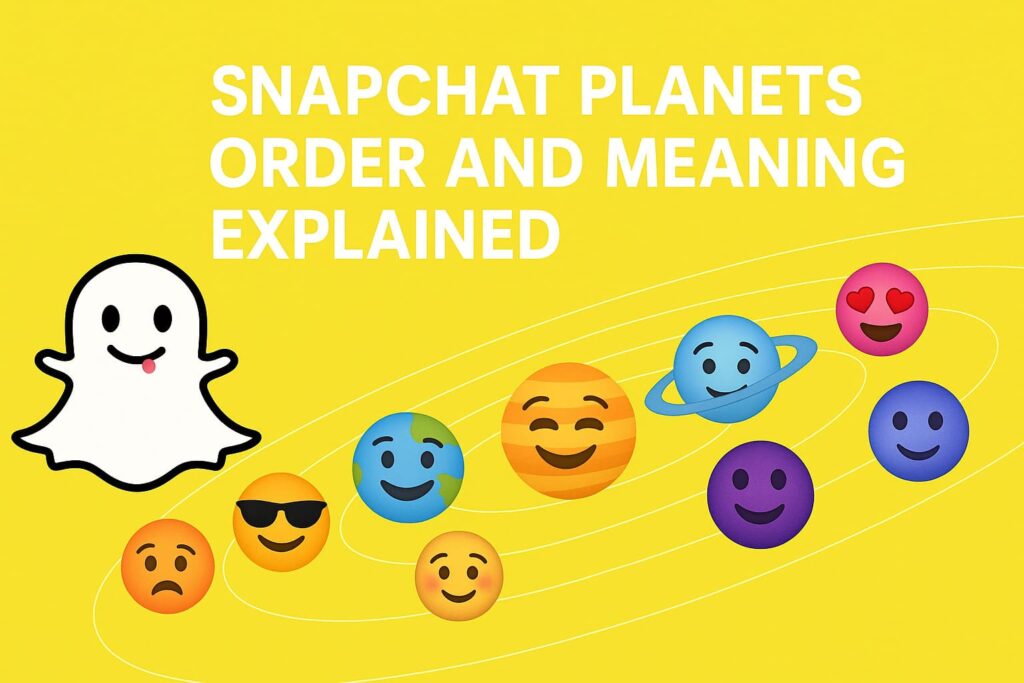
Snapchat has a playful extra feature for Snapchat+ subscribers called the Friend Solar System. It turns your closest friends into planets so you can see where you stand at a glance. You are the Sun at the center, and your top eight friends appear as Mercury through Neptune. The closer the planet is to the Sun in the real solar system, the closer that friend is to you inside the app. This guide explains what the feature is, how it works, the exact order, what each planet looks like in the app, and how to turn it on if you can’t see it yet. The language stays simple and straight to the point.
What Is Friend Solar System In Snapchat
The Friend Solar System is a ranking view inside Snapchat+. The app looks at your recent activity with friends—snaps you send, chats you have, and how frequently you interact—and builds a top-eight list. Each position in that list is represented by a planet. The planets are just visuals; the real meaning is the rank. If you are someone’s Mercury, you are their #1 friend on Snapchat. If you are their Neptune, you’re still in their inner circle, just at the eighth spot.
You must have Snapchat+ to see the planets and the small badge that reveals them. If you are not on Snapchat+, you won’t see this feature at all. Ranks update over time as your activity changes, so your place can move up or down naturally.
How Snapchat Badges Work
You will find the planets through a small badge on a friend’s profile. There are two types of badges:
- Best Friends means you are in each other’s top eight.
- Friends means you are in their top eight, but they are not in yours.
When you tap the badge, Snapchat shows a mini solar system and highlights the planet that marks your rank with that person. The badge text and the planet together tell you the full story: whether the ranking is mutual and exactly where you sit in their list.
The Order of Snapchat Planets and Meaning
The order follows the real solar system: Mercury, Venus, Earth, Mars, Jupiter, Saturn, Uranus, Neptune. That order is fixed. In the app, Mercury always means #1 and Neptune always means #8. The icons are colorful and easy to recognize, and each one matches its real-world counterpart by position.
Now let’s walk through each planet in simple language. This section explains what you’ll see in the app and how each planet lines up with the real solar system order. No tricks, no extra advice—just what the app shows and what the rank means.
Mercury (Rank #1)
In the app, Mercury appears as a small, warm-red planet, often decorated with heart clusters around it. Because Mercury is the closest planet to the Sun, it marks your #1 closest friend on Snapchat. When you see Mercury after tapping the badge, you’re looking at the very top spot.
Venus (Rank #2)
Venus shows as a light or pastel-toned planet, sometimes with colorful hearts. It stands second from the Sun in the real solar system, so in Snapchat it represents your second closest friend. If you see Venus, you’re right near the top of someone’s list.
Earth (Rank #3).
Earth looks like a blue-green globe and may include a small moon and tiny stars. It is the third planet from the Sun, and in Snapchat it maps to your third closest friend. The Earth icon is very recognizable and easy to spot inside the badge view.
Mars (Rank #4)
Mars is shown as a reddish planet, sometimes with stars or hearts nearby. It is the fourth planet from the Sun and marks the fourth position in the app. If you see Mars, you’re still one of the closest friends, sitting just outside the top three.
Jupiter (Rank #5)
Jupiter appears larger than the other icons and often has visible orange or brown bands. In the real solar system, Jupiter is the fifth planet from the Sun and also the biggest. In Snapchat, it means the fifth spot in the top eight.
Saturn (Rank #6)
Saturn is easy to recognize thanks to its ring. It lines up as the sixth planet from the Sun. In the app, seeing Saturn on the badge means you are the sixth closest friend in that person’s list.
Uranus (Rank #7)
Uranus has a cool, green-toned look with a simple design. It is the seventh planet from the Sun, so it marks the seventh position in Snapchat’s lineup. If Uranus appears, you are still part of the top eight, just near the end.
Neptune (Rank #8)
Neptune shows as a calm blue planet. In the solar system it’s eighth from the Sun, and in Snapchat it represents the eighth and final spot in the Friend Solar System. If you see Neptune, you’re at #8 in that friend’s ranking.
How to See Your Planet
You can check your planet from inside a chat with a friend. Open the chat, tap their name to open their profile, and look for a badge with a gold outline that says Best Friends or Friends. Tap the badge. A small solar system graphic appears, and your planet will be highlighted. If there’s no badge at all, either you’re not on Snapchat+, the feature is turned off, or you two are not in each other’s top eight right now.
How to Turn On Solar System Feature On Snapchat
If you have Snapchat+ but still don’t see the solar system, the feature may be off by default. Turning it on takes only a moment.
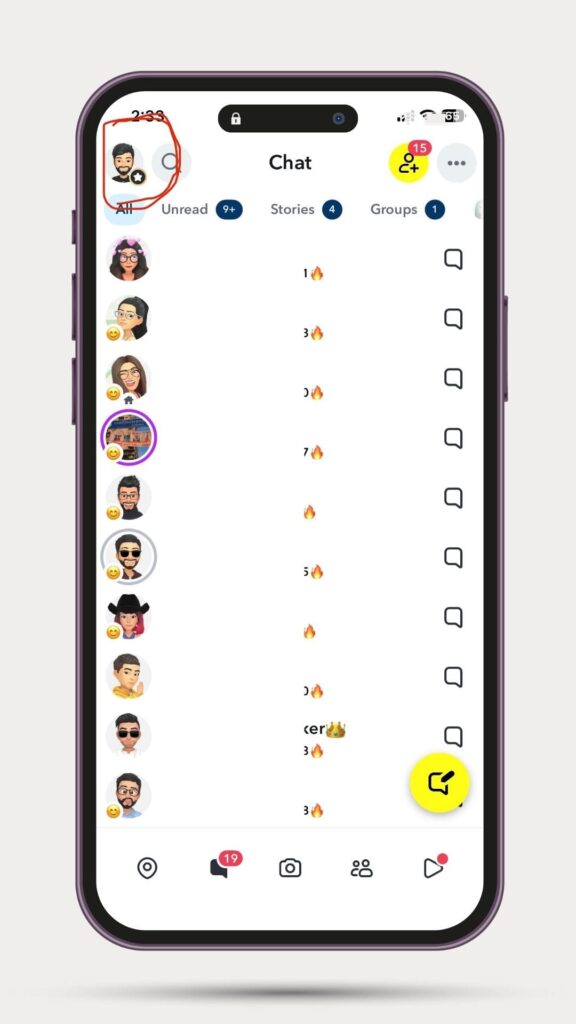
1. Go to your profile by tapping your Bitmoji
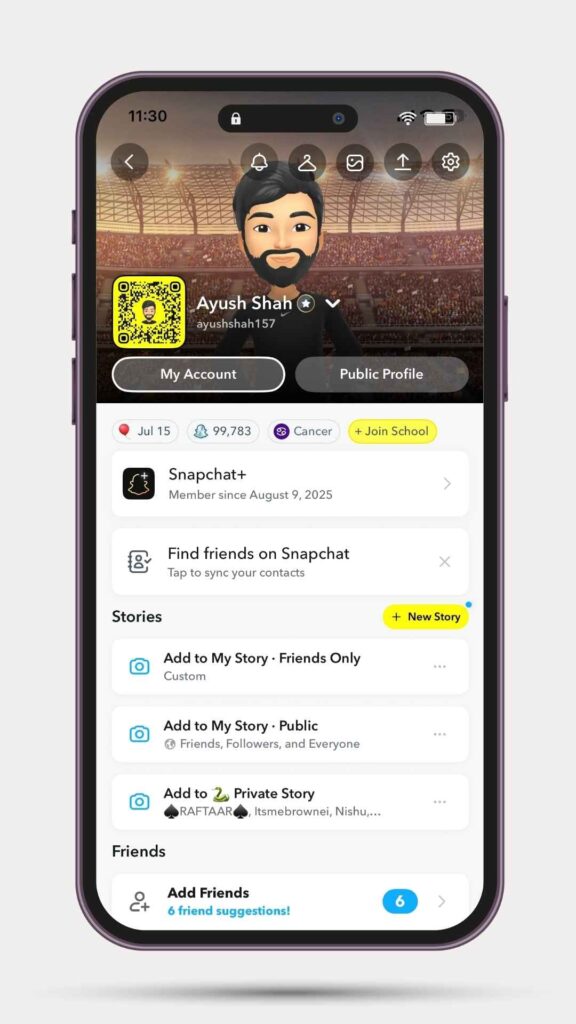
2. open Snapchat+
3. find Solar System, and switch it on
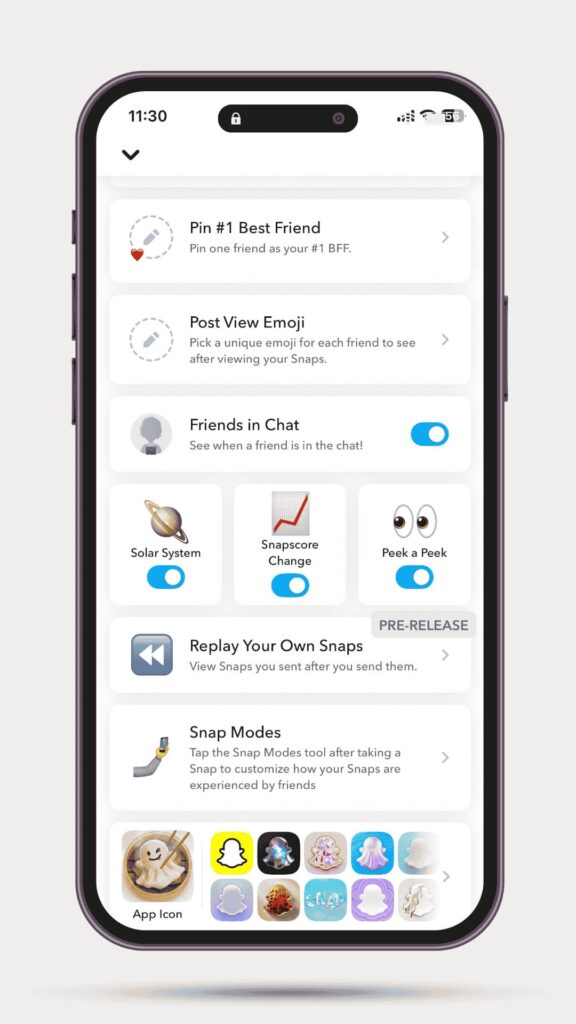
If Snapchat+ itself isn’t visible or the toggle doesn’t show, make sure your subscription is active and update the app to the latest version.
Why the Planets Might Not Show
There are a few common reasons the planets don’t appear. The most common is access: the Friend Solar System is a Snapchat+ feature, so you won’t see it without Snapchat+. Another reason is the setting itself; the Solar System toggle must be on in the Snapchat+ menu. Finally, rankings only cover your top eight. If you don’t see a planet for someone, you may not be in their top eight, or they may not be in yours. Updating the app can also help if the option seems to be missing.
FAQs
Yes. The Friend Solar System is only available for Snapchat+ subscribers.
Eight. Each planet maps to one spot in your top eight friends.
No. The app assigns planets based on recent activity and the ranking order.
Yes. The lineup can shift as your chatting and snapping habits change.
Yes. Turn off the Solar System toggle in the Snapchat+ menu and the badges and planets will not appear.
Final Thoughts
Snapchat’s Friend Solar System takes your top eight friends and turns them into a small galaxy you can read in seconds. You are the Sun, and your closest friends are mapped from Mercury to Neptune in the same order as the real solar system. The icons are bright and easy to recognize, and the meaning is simple: planet equals rank. If you want to see where you stand with someone, open their profile, tap the Best Friends or Friends badge, and your planet will be right there. If the feature doesn’t show, enable Solar System in Snapchat+ and make sure your app is up to date. That’s all you need to use Snapchat planets with confidence.

Get the TrustPost briefing
The stories that matter, in your inbox. No spam, unsubscribe anytime.
Newsletter signup will be available soon.
Related stories

5 Best SEOquake Alternatives for 2026 (When the Sidebar Fails)
If you’ve noticed the SEOquake sidebar or SERP overlay acting up lately, you aren’t alone. With recent browser updates and the shift to new extension frameworks, many legacy tools are struggling to…

10 Best Guest Post Marketplace Platforms to Buy Guest Posts In 2026
If you’ve ever done manual guest post outreach, you know the grind: building lists, vetting sites, pitching editors, waiting weeks for replies, then haggling over anchors and edits. Guest post marketplaces exist…

Best SEO Agencies for Startups
Choosing an SEO agency for startups is different from hiring one for an established business: budgets are tight, positioning changes, and every channel has to show pipeline within a few quarters. This…